11 Clever Ways to Use Pardot Tags for Better Automation
What Pardot Tags are, which assets you can tag, and 11 ways to use them for segmentation, campaign management and automation.

This guide explains what Pardot Tags are, where you can use them, and 11 ways to put them to work in your marketing automation. Tags in Pardot (now Marketing Cloud Account Engagement) often get overlooked next to more formal tools like folders or custom fields.
With a clear plan, they help with segmentation, campaign management and keeping your account in good shape.
- Tags are flexible labels for prospects, accounts, emails, forms, landing pages, lists and more, with no fixed hierarchy.
- Tag all of a campaign’s assets with one tag, and copying the campaign later goes much faster.
- Tags can drive automation, for example in automation rules and Engagement Studio.
- Name tags consistently, audit them quarterly and document your tag strategy.
What Are Pardot Tags?
Pardot Tags are flexible labels you can attach to records and assets for easier segmentation, organization, and identification. They work across prospects, accounts, emails, forms, landing pages, custom redirects, lists, and more. Tags are not tied to hierarchy like folders and allow multiple associations per record, giving you a scalable way to classify and filter data.
Key benefits of Pardot Tags include:
- Unlimited tag creation
- Quick application via manual entry, automation, or bulk tagging
- Clickable, centralized views of all tagged items
- Tag visibility directly within record or asset overview pages
Where You Can Use Tags in Pardot
You can add tags in the following areas:
- Manual Entry: Directly on a record or asset by typing a new tag or selecting from existing ones
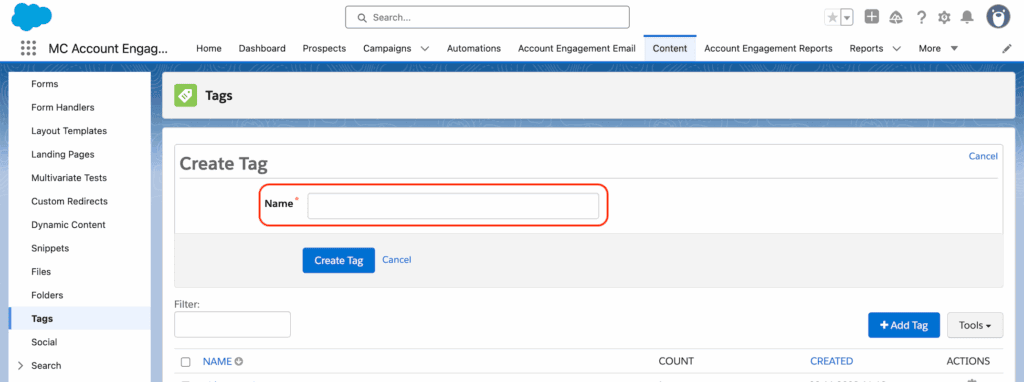
- Tags Overview Page: Go to Content → Tags → + Add Tag
- Automation Rules / Engagement Studio: Use “Apply Tag” actions (automation tagging is only available for prospects)
11 Smart Uses for Pardot Tags
Let’s now explore 11 practical ways to use Pardot Tags for more efficient marketing execution and data hygiene.
1. Faster Campaign Copying
Tags function like dynamic folders. Group emails, forms, landing pages, and files under a campaign tag to easily replicate past campaigns. This eliminates hunting for assets across multiple folders or sections of Pardot.
Example: Tag every asset in your Annual Conference campaign. The following year, pull them up quickly to reuse, update, or measure performance against the previous event.
2. Filter Multilingual Assets
If you manage campaigns across multiple languages, tags allow language-based sorting. Whether you’re customizing content by country or filtering assets during QA, tags like “FR”, “EN”, or “DE” can keep asset libraries clear and accessible.
3. Identify ‘Red Alert’ Prospects
Not everything deserves a custom field. Use tags to flag prospects for quick identification when:
- They’ve engaged with multiple high-intent assets (e.g., pricing page, demo request)
- They’ve attended more than one webinar in a quarter
- They’ve been referred by an existing customer
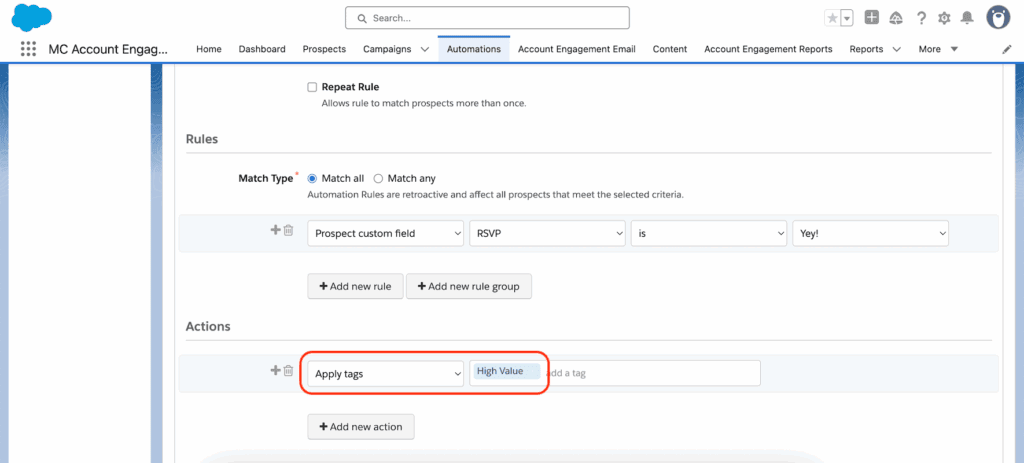
Apply the “High-Value” tag manually or via automation to highlight priority leads without cluttering your data model.
4. Visualize Grading Criteria Gaps
When using profiles and grading, it’s helpful to tag prospects who fail to meet key criteria. Add an “Apply Tag” action alongside grading automation so you can see which attributes are missing and ensure more accurate scoring.
This is particularly helpful in B2B orgs with complex ICPs.
5. Checkpoints in Engagement Studio
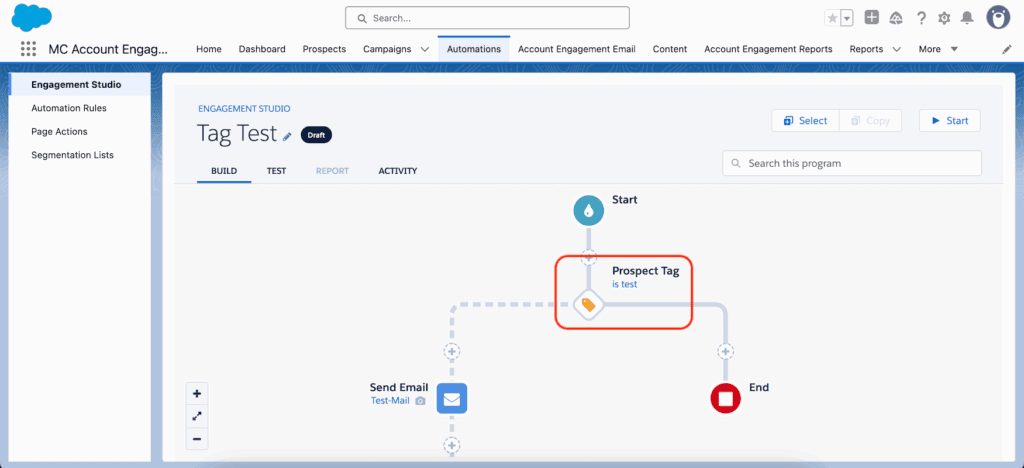
Engagement Studio programs can easily become tangled. Use tags to mark key checkpoints and simplify tracking prospect progress across branches without spinning up endless lists.
You can later use the tag as a trigger or filter for adding prospects to related campaigns.
6. Add Pause Steps in Nurture Journeys
Need to delay a prospect without stalling the entire Engagement Studio program? Apply a tag and insert a long wait period as a pseudo “pause”. Once the wait time is removed or adjusted, the flow resumes naturally.
This is especially useful during sales handoffs or when waiting on an external trigger.
7. Manage Overlapping Engagement Programs
Pardot doesn’t natively allow you to check for a prospect’s presence in another Engagement Studio program. A workaround? Tag them at program entry (e.g. “In-Onboarding-Nurture”) and remove the tag at exit.
Then, use those tags to suppress inclusion in other conflicting journeys.
8. Bridge Engagement Studio and Account/Opportunity Data
Engagement Studio only grants access to Prospect field values for rules. But Automation Rules allow you to filter based on Account, Opportunity, or Custom Object attributes.
Solve this by applying tags via Automation Rules based on those related object fields. Then, use those tags inside Engagement Studio to influence logic where otherwise inaccessible data resides.
| Automation Rule | Engagement Studio |
|---|---|
| Tag based on Account Type = “Enterprise” | Trigger if Tag = “Enterprise” |
9. Consolidate Complex Segmentation into One Tag
Instead of building several dynamic lists for complex segmentation, apply tags that roll up multiple criteria into one visible label.
For example, rather than segmenting mid-market tech prospects in North America with open opportunities and webinar attendance via countless list filters, apply a tag like “Launch-Ready Tech NA”. It’s faster, cleaner, and reusable.
10. Simplify Pardot Migrations
During migrations from another platform, tags help preserve engagement or behavioral classifications when you don’t want to create new custom fields.
Instead of importing dozens of legacy statuses or scores, use imported tags like “Highly Engaged”, “Dormant”, or “Expired Lead” to retain value without bloating your Pardot schema.
11. Enhance B2B Marketing Analytics Filters
Tags can be used as filters in B2BMA datasets and lenses. For instance, if you’ve tagged assets based on campaign objectives (e.g., “Lead Gen”, “Event Retargeting”), you can filter visualizations accordingly for richer insights.
When assets are tagged intentionally, you can compare asset performance across segments within the same dataset or join data from separate dashboards by shared tag structures.
Best Practices for Tag Management
Like any taxonomy strategy, uncontrolled tags can breed chaos. Here are a few tips to keep things organized:
- Apply consistent naming conventions (e.g., campaign-year-purpose format)
- Audit tags quarterly to clean unused or duplicate entries
- Avoid using vague tags like “Test” or “Sample”
- Document your tag strategy so team members understand how and when to use them
Ready to Get More From Your Pardot Setup?
Pardot Tags look simple. Used with a plan, they make daily work easier, support complex automations and help you migrate and scale your marketing cleanly. If you’re unsure where to start, or want help with your Account Engagement setup, get in touch with our team at ConvertPilot.