Pardot Audience List Best Practices for Smarter Campaigns
Six practices for Pardot audience lists, from naming conventions and master lists to nesting, folders and regular audits, so your segments stay consistent.

Six best practices for managing audience lists in Pardot (Account Engagement) give your marketing team the structure to run campaigns with confidence.
A well-organized list structure is the foundation of marketing automation that scales. Without it, your email strategy gets messy fast, with duplicate lists, inconsistent segments and confused users.
- Define a naming convention and stick to it: Pardot doesn’t warn about near-duplicate list names.
- Build master lists, such as email preferences or regions, as reusable building blocks for segmentation.
- Nest lists instead of repeating filter criteria, so segments stay consistent and you make fewer errors.
- Archive one-time lists and keep a folder structure; scoring categories need folders.
- Audit your lists regularly and archive or delete those nobody uses.
Use a Clear and Consistent Naming Convention
Consistency begins with naming. Pardot won’t warn you if list names differ by a character or symbol, which can lead to duplicate or conflicting data. That’s why defining a clear naming convention – and sticking to it – is critical.
To manage this effectively:
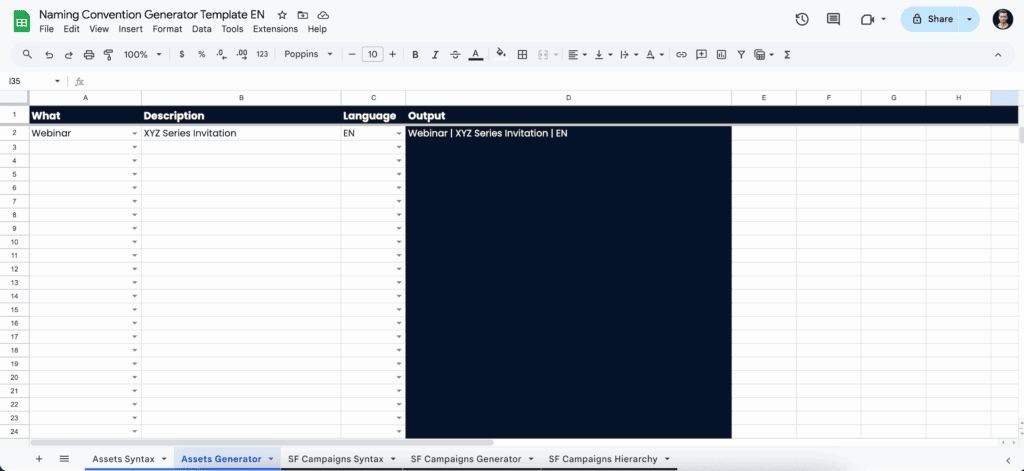
- Create a naming convention generator in Google Sheets or Excel that outlines components like segmentation type, audience, and purpose.
- Ensure everyone uses this generator to build new list names.
- Use delimiters consistently (e.g., underscores vs. hyphens), and document the rules to avoid accidental variations like “event_signup” and “event-signup.”
A well-defined convention can save hours of troubleshooting and alleviate downstream issues across assets and automations.
Establish Master Lists as Segmentation Foundations
Master lists act as reusable building blocks. They group prospects by strategic criteria so you don’t have to redefine filters every time. Set these up early and ensure they reflect your marketing goals and regional or behavioral nuances.
Common master lists include:
- Email Preferences – Opt-ins for newsletters, product updates, events, etc.
- Regions – Countries, states, or broader market segments.
- Lifecycle Stage – Clients, prospects, recycled leads, unqualified contacts.
- Job Role or Industry – Useful for personas or vertical messaging.
Ensure these lists are dynamic where possible so they update automatically based on the latest data. In Marketing Cloud Next, you build these audiences as segments, which Salesforce compares to dynamic lists in Account Engagement; how segments work in Data 360 (formerly Data Cloud) explains the difference.
Use Nested Lists to Avoid Repeated Criteria
Nesting lists allows you to build nuanced segments from master lists – without duplicating complex rules. This method reduces room for error and speeds up campaign setup.
For example, say you want to build a list of clients in Germany. Instead of pulling field-level filters like this:
- Country = “Germany”
- AND Status = “Client”
Instead, reference your master lists by building logic such as:
- Member of “Germany” list
- AND Member of “Clients” list
This way, if your definition of “Clients” changes (e.g., to include Account Tiers), you only need to update the master list, not every individual segment.
Archive Lists You No Longer Actively Use
Not every list needs to be saved forever. Pardot’s archive feature lets you remove older, one-time-use lists from the active view – without deleting them entirely.
Using the Archive Date setting helps keep your workspace uncluttered:
- Archived lists won’t show in dropdowns or be selectable in emails or automations.
- They’re still usable as criteria within automation rules if needed.
- You can set or update Archive Dates anytime after a list is created.
This best practice simplifies list management and reduces the risk of choosing old or incorrect recipient lists.
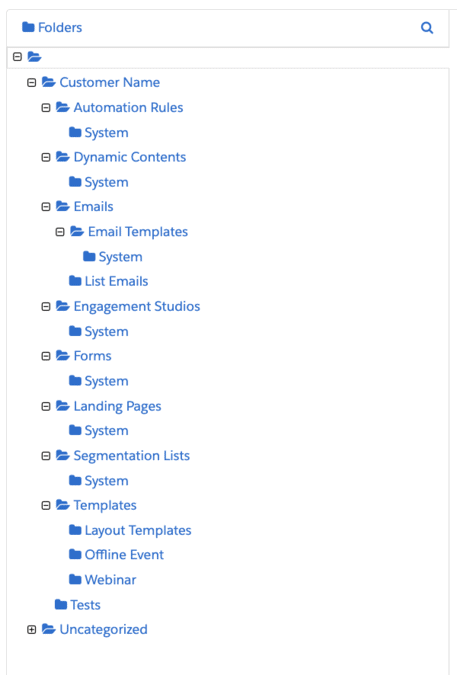
Create and Maintain a Folder Structure
Pardot’s folder functionality might be limited compared to modern file systems, but using it effectively is essential – especially if you plan to use scoring categories, which require folders.
To build a structure that scales:
- Define a top-down folder hierarchy before creating content assets or lists.
- Segment folders by campaign type, year, region, or product line – whatever fits your organizational strategy.
- Communicate the folder rules internally and revisit them regularly as new users onboard.
This avoids the common mistake where individual users create ad hoc folders, leading to a fractured and inconsistent structure over time.
Audit and Clean Lists Regularly
Your team’s needs – and your data – will evolve. Regularly reviewing your master and nested lists ensures they remain relevant, accurate, and aligned with your latest segmentation strategy.
As part of your auditing process:
- Recite list criteria aloud to ensure they reflect current definitions.
- Check for inactive or empty lists, and archive or delete as needed.
- Review logic and match types (e.g., “any” vs. “all” rules).
Cleaning up old or inaccurate lists also minimizes confusion for newer users and streamlines campaign execution.
Key Takeaways
| Best Practice | Why It Matters |
|---|---|
| Use Naming Conventions | Improves clarity, prevents duplication, and creates consistency |
| Create Master Lists | Enables scalable segmentation through shared filters |
| Nest Lists | Reduces errors and simplifies segmentation reuse |
| Archive Unused Lists | Keeps the environment clean and dropdowns usable |
| Establish Folders | Supports scoring categories and long-term organization |
| Regularly Clean and Audit | Ensures list criteria are still effective and accurate |
Get More Out of Pardot With Better List Management
Audience lists do more than hold records: they make targeted messages, precise automation and quick campaign changes possible. With these list management practices in Pardot, your team works faster, stays aligned and runs better campaigns.
To tidy up your Pardot operations and sharpen your segmentation, get in touch with our team and we’ll show you how we can help.