Salesforce Automations Every Pardot User Should Know
Discover 10 powerful Salesforce automations every Pardot user should leverage to boost lead management, reporting, and cross-team alignment.

One of Pardot’s greatest advantages is its native integration with Salesforce CRM – yet many marketing teams underutilize the automation potential on the Salesforce side. From improving lead assignment to enriching reporting, Salesforce automations can transform how you manage campaigns, qualify prospects, and collaborate across sales and marketing.
In this article, we’ll explore ten impactful automations designed specifically to boost your Account Engagement (Pardot) setup.
- Use Salesforce lead assignment rules and queues for routing logic that Pardot can’t handle on its own.
- Once Salesforce owns a prospect, Pardot can’t reassign it; complex reassignment needs Apex.
- Automate campaign membership and require opportunity contact roles, so attribution and influence reports work.
- Stamp lifecycle dates such as MQL and SQL on leads and contacts to report on funnel velocity.
- Use Salesforce duplicate rules to catch the duplicate prospects that AMPSEA allows.
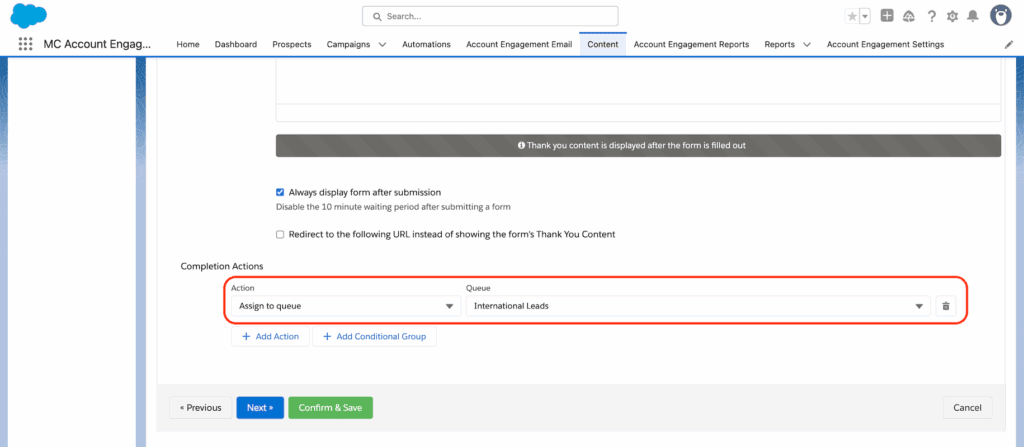
1. Lead Assignment and Salesforce Queues
Lead assignment is one of the most common and critical automations for marketing ops, ensuring that no valuable prospect falls through the cracks. Pardot offers options here, but Salesforce enables much more robust and centralized logic for lead routing.
Use Salesforce Lead Assignment Rules
Salesforce lead assignment rules can contain multiple conditionally triggered entries that direct leads to the right owner or queue. While Pardot can assign prospects, leveraging Salesforce ensures consistency with your sales team’s process and CRM governance. It supports more flexible rule logic and simplifies maintenance.
Fallback with Salesforce Queues
When you don’t know the owner at the moment of handoff – or want to hold off on sales follow-up – Salesforce Queues provide a safeguard and staging ground. Ideal use cases include:
- Leads awaiting qualification (e.g., routed to a “marketing nurture” queue).
- Bulk assignment of leads to teams (rather than individuals).
- Automation-friendly reassignment to MQL owner queues when ready.
2. Pardot Prospect Reassignment Logic
Once Salesforce assigns ownership of a Pardot prospect (via the Lead or Contact record), Pardot loses the ability to make further changes to that field. This often leads to challenges when requalification or lifecycle loops are required.
Solution: Apex for Complex Ownership Changes
For reassignment workflows on existing records, you’ll need to implement Apex. This allows reassignment beyond the point of initial lead creation, supporting scenarios like recycling disqualified leads or routing active prospects back into nurture for further qualification.
3. Automatically Add Prospects to Salesforce Campaigns
Adding leads and contacts to Salesforce Campaigns is critical to campaign attribution and segmentation. But doing so manually is inefficient and often inconsistent.
Automated Campaign Member Creation
Several automation options exist – Salesforce Flows, Engagement Studio, process automation tools – but one standout is the Mass Action Scheduler. This app enables automated addition and removal of campaign members based on report data or list views on a set schedule.
- Create recurring logic to keep campaign membership in sync with backend engagement.
- Extend attribution tracking across long-running campaigns with dynamic list syncing.
4. Add Opportunity Contact Roles Automatically
Opportunity Contact Roles form the bridge between your deals and the people influencing them. Without them, Salesforce can’t track campaign influence or build meaningful opportunity-pipeline reports in Account Engagement.
Option to Enforce Contact Roles
- Use a Salesforce validation rule to block opportunity creation unless roles are added.
5. Opportunity-Based Segmentation in Pardot
Most marketers limit their segmentation to lead, contact, and account fields. However, you can segment Pardot prospects based on opportunity data – including deal stage, close date, or opportunity value – using Salesforce custom fields and dynamic lists.
Pipeline-Aware Marketing Automation
- Nurture late-stage opportunity contacts with specific messaging based on deal proximity.
- Exclude deals already marked “Closed Won” from general promotions to avoid confusion.
- Trigger post-sale campaigns based on opportunity status.
6. Calculate Customer Lifetime Value (CLV)
Customer Lifetime Value helps teams prioritize marketing spend and relationship management. By summing all “Closed Won” opportunities against an account, CLV offers a practical metric for strategic planning.
Implementation Tip
Create a roll-up summary field on the Account record to calculate total won revenue. With this, you can:
- Target key accounts more effectively.
- Create lookalike campaigns based on your highest-value customers.
- Influence ABM segmentation and prioritization.
7. Customizable Prospect Lifecycle Reporting
Understanding exactly how many MQLs and SQLs your marketing has generated – and how quickly leads move through your funnel – is essential for revenue operations and alignment.
Steps to Set It Up
- Create checkbox and date fields on Leads and Contacts (e.g., MQL Date, SQL Checkpoint).
- Sync these fields with Pardot and use automation to stamp lifecycle stages.
- Calculate velocity between stages using formula fields – and feed it into dashboards.
8. Run Automated Birthday Campaigns
Datestamps in Salesforce create opportunities for small but personal touches. For example, with a birthdate field populated, you can build automations to trigger greetings, gifts, or exclusive content.
Why It Requires Salesforce
Pardot struggles with advanced date logic. But Salesforce Formula fields can calculate when a birthday is upcoming and flag a record accordingly, allowing Engagement Studio to execute the rest.
9. Automate Campaign Approvals
If your team supports multiple departments or product lines, campaign asset approval workflows increase speed and governance. While Pardot lacks native approval systems, Salesforce Campaigns fill the gap.
Automation Opportunities
- Trigger approval flows based on campaign status or stage.
- Send internal reminders to complete fields like budget, start date, or target metrics.
- Route assets for review before activation.
10. Identify and Prevent Duplicate Prospects
Since Pardot allows multiple prospects with the same email (AMPSEA), duplicates can destroy data quality. Salesforce’s duplicate rule logic is far more advanced and customizable.
Suggested Tools and Strategies
- Enable Salesforce duplicate rules to block or flag duplicates before they become issues.
- Leverage third-party tools like DemandTools or Duplicate Check for advanced matching and merge rules.
| Tool | Purpose |
|---|---|
| Salesforce Duplicate Rules | Control on-create and on-edit duplicates within Salesforce fields |
| DemandTools | Deep deduplication, prevention, and batch cleansing |
| Duplicate Check | Fuzzy matching and customizable duplicate handling |
Next Steps with Salesforce Automation and Pardot
These ten automations are just the beginning. With Salesforce’s flexibility and Pardot’s engagement capabilities, you can co-engineer powerful cross-system workflows that enhance speed, accountability, and marketing ROI. Start small by localizing simple changes – like lead queues or campaign member automation – before expanding into full-fledged lifecycle frameworks or custom Apex logic.
If you’re ready to transform your Pardot setup by embracing the full potential of Salesforce automation, get in touch with us. We help teams like yours align systems, solve integration bottlenecks, and build smarter marketing automation every day.