Extend Pardot Automation With External Actions
How External Actions let Pardot’s Engagement Studio trigger steps in other tools, such as Zoom webinar registrations or SMS, without middleware, and how to set them up.

External Actions connect Pardot (now Account Engagement) to the rest of your tech stack, and this article shows how they work and how to set them up. They close a big gap between your marketing automation and your other tools.
From Engagement Studio, you can trigger real-time actions in third-party platforms, such as registering someone for a webinar, sending an SMS or syncing data to an external CRM system. That replaces workarounds with platforms like Zapier.
- External Actions let Engagement Studio trigger actions in other systems, such as webinar registrations or SMS.
- They’re built as Marketing App Extensions that connect through the Pardot API, and need a Connected App in Salesforce.
- External Activities work in the opposite direction: they record what happens in the other system, such as webinar attendance.
- Monitor usage and failed steps in the External Actions dashboards in the Pardot settings.
What Are External Actions in Account Engagement?
External Actions enable Engagement Studio to communicate with systems outside of Pardot. You can trigger actions like:
- Registering a prospect for a webinar
- Sending an SMS via a messaging platform
- Triggering a survey invite in a third-party tool
- Logging a support case in Salesforce
These actions extend beyond marketing communication – they can also initiate workflows on the Salesforce platform or integrate with virtually any system that supports API interactions.
Previously, you were limited to out-of-the-box connectors. Now, External Actions open the door to virtually limitless use cases – no middleware or Zapier required.
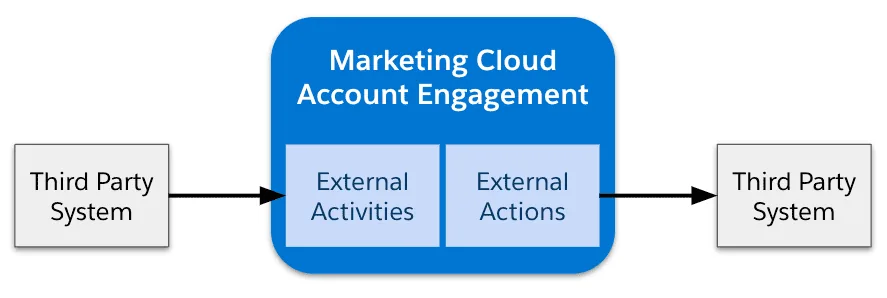
How Pardot External Actions Work
To make External Actions function effectively, Salesforce has implemented them as part of Marketing App Extensions – components that connect Engagement Studio to external systems via the Pardot API.
Standalone or Combined with External Activities
You can implement External Actions in two ways:
- Standalone Action: Trigger an external event without tracking it in Pardot (e.g., quietly registering for a webinar).
- Action + Activity: Trigger the event and log the result in Engagement History for tracking and reporting (e.g., also logging webinar attendance).
Setting Up External Actions: Step-by-Step
While the possibilities are exciting, setting up External Actions requires coordination between your marketing and development teams. Here’s how to approach it:
1. Create a Connected App
To connect Pardot to a third-party application, you’ll need to create a Connected App in Salesforce. This authenticates communication between the systems using OAuth tokens.
2. Work with a Developer to Build an Invocable Action
An Invocable Action is a packaged piece of Apex code that allows a process (like Engagement Studio or Flow) to trigger custom logic. Your developer will:
- Define input parameters like webinar IDs or SMS message content
- Write Apex logic to call the external system via an API
- Register the action as a MarketingAppExtAction metadata type
| Component | Description |
|---|---|
| MarketingAppExtension | Connects Pardot to external systems |
| MarketingAppExtAction | Defines specific actions a platform can take |
3. Set Up the Marketing App Extension
Once the developer has built your invocable action, it’s time to configure the Marketing App Extension:
- Navigate to Marketing Setup in Account Engagement
- Select Marketing App Extensions and create a new one
- Define the extension’s properties (e.g., name, description, endpoints)
- Under Action Types, link the invocable action
- Enable the action for automations by marking it as Active
4. Use in Engagement Studio
Once active, your custom action becomes available inside Engagement Studio. You’ll see a new action under the “Actions” category called Custom Action.
From there, you can dynamically set the parameters within the journey. For example, register a prospect for a specific Zoom webinar based on their signup form responses – or send an onboarding SMS as soon as they convert.
Listening for Follow-up Events with External Activities
Automations don’t always end with sending data out. Use External Activities to listen for a response or action in the external system. For example:
- Trigger: A prospect submits a webinar form
- External Action: They’re registered for the webinar
- External Activity: Their attendance result is recorded back in Pardot
This allows you to build highly responsive and intelligent Engagement Studio programs based on real-world actions and outcomes.
Pardot External Actions Use Case: Adding Prospects to Zoom Webinars
Let’s bring this to life with a practical example. Suppose you’re hosting webinars regularly and want to automate registrations as part of a lead nurture track.
Here’s how an External Action for Zoom might work:
- The prospect completes a webinar registration form
- An External Action in Engagement Studio fires and calls Zoom’s API
- Zoom registers the user and sends their unique join link
- (Optional) An External Activity tracks whether they attended
No manual data entry. No jumping between systems. Just a seamless, data-driven experience for both marketers and prospects.
Monitoring Errors and Usage
As with any integration, things can go wrong. Pardot provides two dashboards to help monitor and troubleshoot:
| Tool | Description |
|---|---|
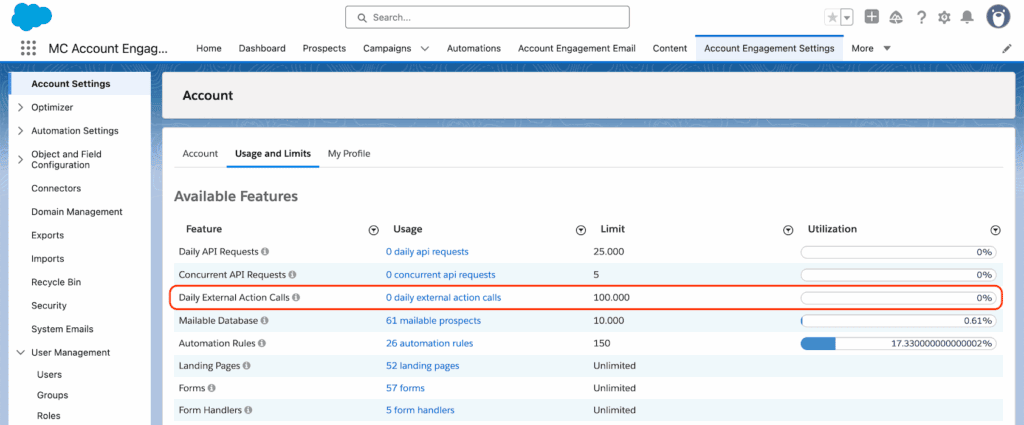
| External Actions Usage | Review usage of connected third-party apps |
| External Action Errors | Identify and resolve failed automation steps |
You can find these under Pardot Settings → Account Settings → Usage and Limits, and Pardot Settings → External Action Errors.
Why External Actions Matter for Your MarTech Stack
Modern marketing requires coordination across channels and platforms – and until now, Account Engagement has been limited in its ability to orchestrate those interactions. With External Actions, that limitation is gone.
This feature transforms Pardot from a standalone email automation tool into a central brain for your B2B marketing engine. It enables full integration with SMS, webinars, events, and other customer engagement platforms – reducing friction and increasing personalization potential.
Final Thoughts
External Actions significantly expand what Account Engagement can do. With a little development support, marketers can now connect Pardot to the tools they already use to nurture leads, close deals and measure performance.
Whether you’re thinking about integrating webinar platforms, CRMs or data enrichment tools, we can help you assess, design and implement the External Actions use cases with the most impact.
Get in touch with our team to explore how you can extend Pardot’s capabilities with External Actions.