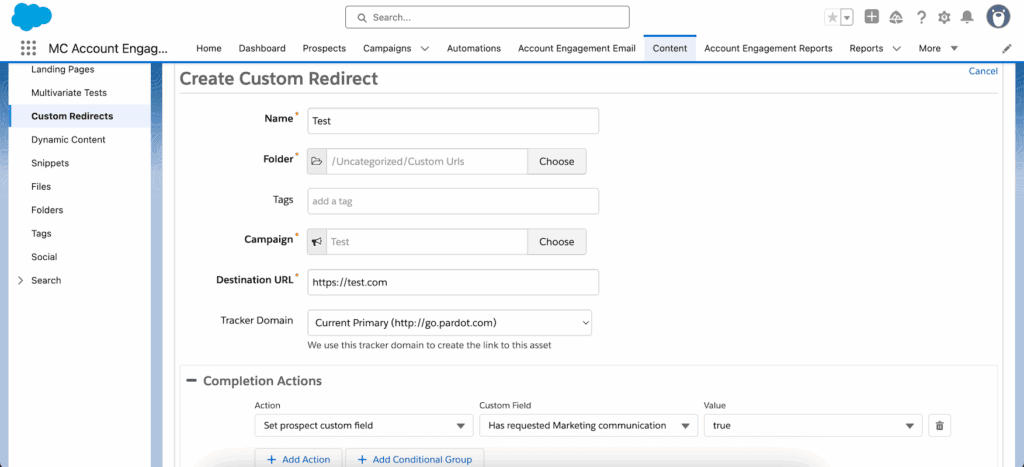
This article shows seven ways to use custom redirects in Pardot (now Salesforce Account Engagement) for more than simple link tracking. They capture engagement and can trigger automations, especially when your prospects are already cookied, which makes them useful well beyond standard email campaigns.
Each idea helps you understand prospect behavior better, extend your automation and make better-informed marketing decisions.
Key takeaways
Custom redirects are trackable links; a click by a cookied prospect can trigger completion actions.
Use them to track social media posts, surveys, print campaigns and file downloads, beyond email.
Completion actions fire only for identified, cookied prospects on the same browser and device.
Anonymous clicks still count, but trigger no actions.
Understanding Pardot Custom Redirects
At their core, Pardot custom redirects are links that are trackable within Account Engagement. When a cookied prospect clicks a custom redirect, it can trigger Completion Actions, like updating a field, adding the person to a list, or assigning them to a user.
While useful for monitoring anonymous clicks, they’re especially powerful for engaging known prospects – those who’ve previously filled out a form or been cookied by Pardot on a specific browser/device. Here’s what makes up a custom redirect:
Tracked URL: The destination you want the prospect to land on.
Completion Actions: Automated follow-up actions taken when a cookied prospect uses the link.
Reporting: Click data, segmented by total clicks and cookied (known) prospects.
It’s critical to note: Completion Actions only fire when a known prospect uses the same browser and device they were cookied on. So, manage expectations around what custom redirects can and can’t capture reliably.
7 Smart Use Cases for Pardot Custom Redirects
1. Track Social Media Engagement
Custom redirects fill the gaps left by Pardot’s native social connectors. They help you monitor traffic from platforms or tools not supported by Pardot natively:
Track links posted on channels like Instagram or YouTube.
Measure engagement from posts published via Hootsuite or Buffer.
Track individual team member posts outside Pardot’s publishing features.
While social click data boosts visibility, be cautious with cross-device attribution – clicks from a different browser/device than originally cookied won’t trigger actions.
2. Monitor Banner Ad Performance
Banner ads on third-party sites create a blind spot for Pardot. Google Analytics can show general referral data, but if you’re looking to understand which specific prospects engaged, custom redirects give you the edge:
Track total banner clicks within Pardot critically and quickly. With the placement's cost and impressions, our CPM calculator turns them into CTR and cost per click.
Identify cookied prospects that clicked through from partner or sponsorship placements.
3. Run a Lightweight NPS Survey
This is a clever (and budget-friendly) way to run Net Promoter Score (NPS) surveys using nothing but Pardot. No external survey tools required.
Here’s the basic setup:
Create a custom number field called “NPS Score.”
Create 10 custom redirects, each associated with a score (0-10).
Add a Completion Action to each redirect to populate the NPS score appropriately.
Design an email with 10 clickable images/links acting as buttons.
Each click updates the record – so long as the respondent is a known, cookied prospect using the same browser/device.
4. Embed Questions Within Emails
This same method can be expanded to collect responses to any predefined question. For example, “When should we follow up on your inquiry?”
Use custom redirects linked to answer options within email content. Completion Actions can then update a custom field or add the respondent to a segmented list.
Gauge lead intent or readiness without requiring a form fill.
Let prospects control the pace of your follow-up.
Important Note:
As always, Completion Actions will only fire if the user is known and using the same cookied browser/device.
5. Track External Document Views
Not everything you share lives inside Pardot. If you’re distributing files hosted on a DAM system or sales enablement platform, custom redirects help you track views and engagement:
Wrap an external PDF, Word doc, or image URL in a custom redirect.
Track document views directly inside Pardot – even if the file isn’t stored there.
Trigger actions like alerts or scoring when the file is accessed.
This is particularly useful when you manage limited file storage or scale your asset library across systems.
6. Bridge the Offline-Online Gap in Direct Mail
Direct mail is experiencing a resurgence – but only if you can measure it. Adding a Pardot custom redirect to the printed piece gives you a measurable ROI path:
Print custom redirect URLs like go.yourdomain.com/coupon on mailers.
Track who claims an offer or responds to a CTA from print.
Trigger prospect grading or sales alerts the moment someone visits the link.
For best results, the recipient should already be a known prospect. If not, consider including a form on the landing page to establish identity going forward.
7. Identify Email Bot Traffic
Email security tools often scan emails before delivery to ensure they’re safe. This includes clicking all links – potentially inflating your reports with ghost clicks.
Use a hidden custom redirect (invisible to human recipients) in your email to isolate bot activity. If the hidden link is clicked, that activity didn’t come from a real user.
Use this insight to:
Refine email engagement metrics.
Avoid triggering automations based on bot clicks.
Key Considerations and Limitations
While Pardot custom redirects are versatile, there are caveats to keep in mind:
Known prospect requirement: Completion Actions only trigger for cookied, identified users.
Same browser/device condition: If a cookied prospect switches devices or browsers, the redirect won’t fire Completion Actions for them.
Anonymous clicks: These still show in total/unique click reports but won’t drive automations.
Always frame your expectations appropriately when using redirects for tracking or triggering workflows. They’re best used as indicators of engagement, not absolute proof of intent.
Final Thoughts
Used creatively and with their limitations in mind, Pardot custom redirects give you a wide range of marketing insights and automation triggers. From social content and surveys to print campaigns and file tracking, they extend your automation well beyond email engagement.
Want to build campaigns in Pardot that you can measure better? Get in touch and we’ll look at what’s possible together.