
8 Best Marketing Automation Software for B2B (2026 Guide)
We compare eight B2B marketing automation platforms, including Pardot, HubSpot and Marketo, on features, pricing, compliance and fit for your team.

This guide compares eight marketing automation platforms to help you choose the right one for your B2B business. With so many options, it’s hard to know whether to go with the popular choice, the most expensive one or the new platform everyone is talking about.
We’ve spent the last few years implementing marketing automation for B2B companies of all sizes, and we share what actually works and what doesn’t. The guide looks past the marketing hype at the real strengths and limitations of each platform, with a special focus on Pardot (Marketing Cloud Account Engagement) and other leading solutions.
By the end, you’ll have a clear picture of which platform fits your specific needs.
- The guide compares eight platforms: Pardot, HubSpot, Marketo, Oracle Eloqua, ActiveCampaign, Freshmarketer, Zoho and Mailchimp.
- The right fit depends on your needs, budget and growth plans; there’s no one-size-fits-all solution.
- Enterprises need multi-region capabilities, advanced security and complex workflows; smaller teams value ease of use.
- Check compliance and security: GDPR and CCPA, data residency, consent management, SSO and two-factor authentication.
Understanding Marketing Automation Software in 2026
Let’s beginn with the basics.
What is Marketing Automation Software?
Think of marketing automation software as your digital marketing command center. It’s like having a virtual marketing team that works 24/7, handling repetitive tasks while you focus on strategy and creativity. In 2026, these platforms have evolved far beyond simple email automation – they’re now sophisticated ecosystems that can handle everything from lead scoring to advanced personalization.
Key Benefits of Marketing Automation for B2B Companies
- Increased Efficiency and Productivity
- Automate repetitive tasks, saving hours per week per team member
- Streamline workflow between marketing and sales teams
- Reduce manual errors in campaign execution
- Better Lead Management
- Sophisticated lead scoring and grading
- Automated lead nurturing sequences
- Real-time lead tracking and analytics
- Improved ROI Tracking
- Comprehensive campaign attribution
- Multi-touch revenue tracking
- Detailed ROI reporting capabilities
Essential Features To Look for in B2B Marketing Automation Platforms
Let’s look at some essential features to look for.
Lead Management and Scoring
Modern B2B marketing automation platforms should offer robust lead management capabilities. Look for features like:
- Custom scoring models
- Behavioral tracking
- Progressive profiling
- Lead assignment rules
Email Marketing Automation
Email remains the backbone of B2B marketing. Essential features include:
- Dynamic content personalization
- A/B testing capabilities
- Email builder with responsive templates
- Engagement tracking and analytics
Campaign Management
Your platform should excel at:
- Multi-channel campaign orchestration
- Campaign calendar management
- Asset management
- Performance tracking
Analytics and Reporting
Look for platforms offering:
- Custom dashboard creation
- Real-time reporting
- Revenue attribution modeling
- ROI tracking
CRM Integration Capabilities
Seamless CRM integration is crucial for:
- Bi-directional data syncing
- Lead-to-opportunity tracking
- Sales and marketing alignment
- Complete customer view
| Feature Category | Must-Have Features | Advanced Features |
|---|---|---|
| Lead Management | Scoring, Grading, AI-Driven Lead Predictions, Assignment Rules | Custom Scoring Models, Advanced Lead Routing Logic |
| Email Marketing | Templates, A/B Testing, Analytics, Smart Personalization | Dynamic Content Generation, Behavioral Triggered Campaigns |
| Analytics | Custom Dashboards, AI-Powered Insights, Performance Tracking | Advanced Attribution Modeling, Custom Report Builder |
| Integration | CRM Sync, API Access, Webhook Support | Custom Integration Framework, Third-party App Ecosystem |
| Automation | Smart Workflow Builder, Predictive Analytics | Complex Branching Logic, Multi-trigger Automation |
Top 8 Marketing Automation Software Solutions Compared
Ever wondered why some companies swear by one platform while others can’t stop praising another? Let’s break down what makes each of these solutions unique, and more importantly, who they’re really best suited for.
This list is in no particular order.
Navigate directly to each software:
- Pardot (Marketing Cloud Account Engagement)
- HubSpot Marketing Hub
- Marketo Engage
- Oracle Eloqua
- ActiveCampaign
- Freshmarketer by Freshworks
- Zoho Marketing Automation
- Mailchimp Marketing Automation
Pardot (Marketing Cloud Account Engagement)
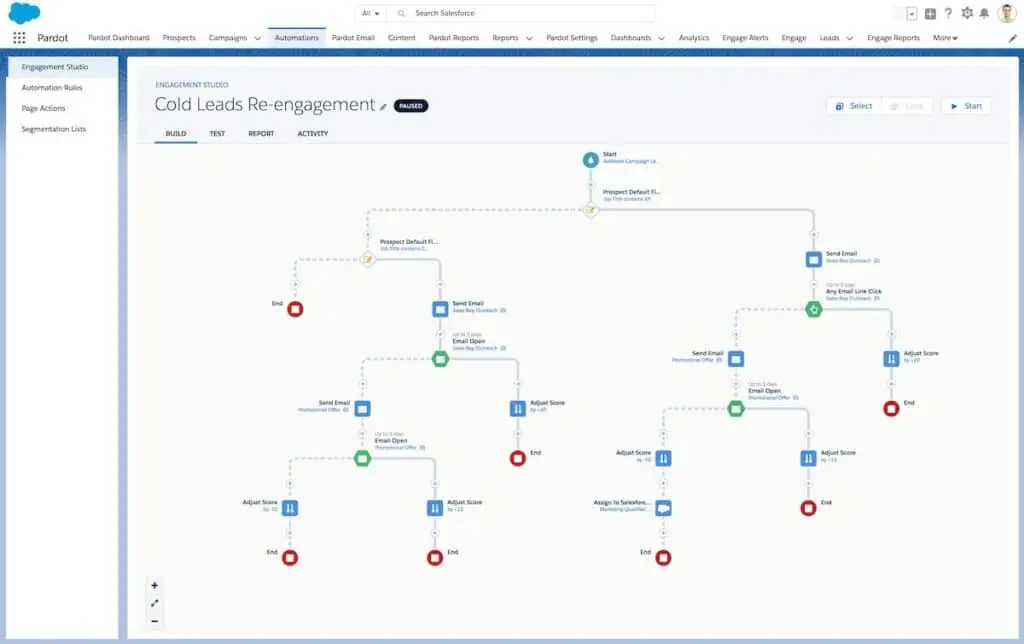
Remember when B2B marketing was all about spray-and-pray email campaigns? Those days are long gone. As a team that has implemented Pardot (Marketing Cloud Account Engagement) for companies ranging from startups to enterprise organizations, we can tell you it’s particularly strong in one area: turning complex B2B sales cycles into streamlined, automated processes. With its flexible pricing model and different editions, it fits organizations of various sizes. Salesforce also sells Marketing Cloud Next and Marketing Cloud Engagement; how Pardot compares with the other Marketing Cloud products shows which one fits a B2B team.
Software: Pardot (Marketing Cloud Account Engagement)
Key Features and Capabilities
- Advanced Lead Scoring and Grading
- Behavior-based scoring that adapts to your prospect’s engagement
- Custom grading criteria based on your ideal customer profile
- Progressive profiling to enrich lead data over time
- Einstein AI Integration
- Predictive lead scoring
- Behavior analytics and insights
- B2B Marketing Analytics
- Custom report builder
- Multi-touch attribution modeling
- ROI tracking across campaigns
| Features | Growth+ | Plus+ | Advanced+ | Premium+ |
|---|---|---|---|---|
| Price (per org, as of October 2026) | $1,250/month | $2,750/month | $4,400/month | $15,000/month |
| Pricing Basis | Per org | Per org | Per org | Per org |
| Base Contacts | 10,000 | 10,000 | 10,000 | 75,000 |
| Best For | Small B2B teams starting with automation | Mid-size B2B companies | Large B2B organizations needing ABM | Enterprise B2B requiring advanced AI and analytics |
Note: Additional contacts can be purchased.
Integration Options
- Native Salesforce CRM integration
- Google Ads connector
- GoToWebinar connector
- Custom API access
Pardot Marketing Automation Software is Best Suited For
- You’re already using Salesforce CRM (the integration is seamless)
- Your sales cycle is complex and needs nurturing
- You’re focused on account-based marketing
- You need sophisticated lead scoring and grading
- Your marketing strategy is heavily focused on B2B
Pros and Cons
Pros:
- Deepest Salesforce CRM integration available
- Superior B2B-focused features
- Robust lead scoring and grading
- Excellent account-based marketing capabilities
- Strong compliance and security features
Cons:
- Higher price point compared to some alternatives
- Can be complex to set up initially
- Limited B2C capabilities
- Learning curve for new users
- Some advanced features only in higher tiers
HubSpot Marketing Hub
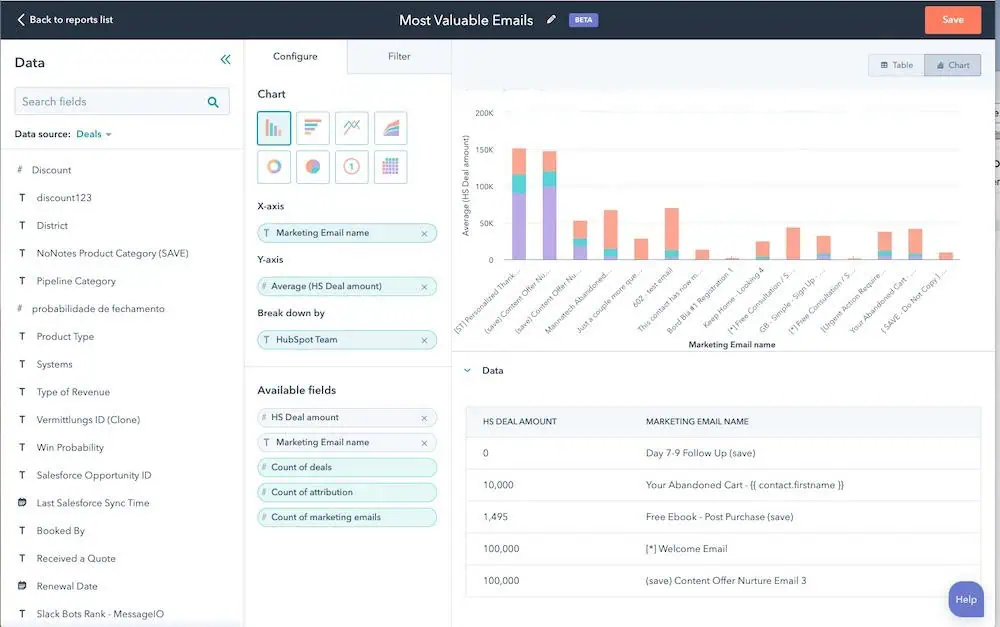
If you’re looking for the “do-it-all” platform that won’t require a Ph.D. to operate, HubSpot might be your answer. What makes it special? It’s the rare platform that manages to pack enterprise-level features into an interface that your team can actually master within weeks, not months.
Software: HubSpot Marketing Hub
Key Features and Capabilities
- All-In-One Marketing Platform
- Integrated CRM at no additional cost
- Built-in CMS with drag-and-drop editing
- Social media management tools
- Meeting scheduling functionality
- Smart Automation Tools
- Visual workflow builder with branching logic
- Behavioral trigger-based automation
- Predictive lead scoring
- Multi-channel campaign orchestration
- Content Creation and Optimization
- SEO recommendations in real-time
- A/B testing for emails and pages
- Content strategy and planning tools
- Smart content personalization
| Features | Marketing Hub Starter | Marketing Hub Professional | Marketing Hub Enterprise |
|---|---|---|---|
| Base Price (as of October 2026) | From $20/month per seat | From $100/month per seat | From $175/month per seat |
| Billing Term | Monthly or Yearly | Monthly or Yearly | Monthly or Yearly |
| Pricing Basis | Per seat | Per seat | Per seat |
| Best For | Small teams getting started with marketing automation | Growing teams needing advanced automation | Enterprise teams needing custom solutions and advanced features |
Note: Prices per seat as shown on HubSpot’s product page in October 2026 (Starter shows a lower price for new customers). Additional contacts can be purchased.
This pricing structure means that while HubSpot might appear less expensive initially, you need to factor in the cost of additional users as your team grows. Pardot, on the other hand, charges per instance regardless of the number of users, which could be more cost-effective for larger teams.
Integration Options
- Native CRM integration
- WordPress connector
- Shopify integration
- Extensive app marketplace
- Robust API access
- Custom webhook creation
HubSpot Marketing Hub Marketing Automation Software is Best Suited For
- Teams needing an all-in-one solution
- Organizations scaling marketing gradually
- Content marketing-focused companies
- Mixed B2B and B2C approaches
- Small to mid-sized businesses
- Companies valuing ease of use
Pros and Cons
Pros:
- Incredibly user-friendly interface
- Comprehensive feature set
- Excellent educational resources
- Strong community support
- Regular platform updates
Cons:
- Can get expensive with contact scaling
- Additional features mean additional costs
- Less specialized than pure B2B tools
- Limited customization in lower tiers
- Some advanced features require Enterprise plan
Check out our detailed Hubspot vs Pardot article here.
Marketo Engage
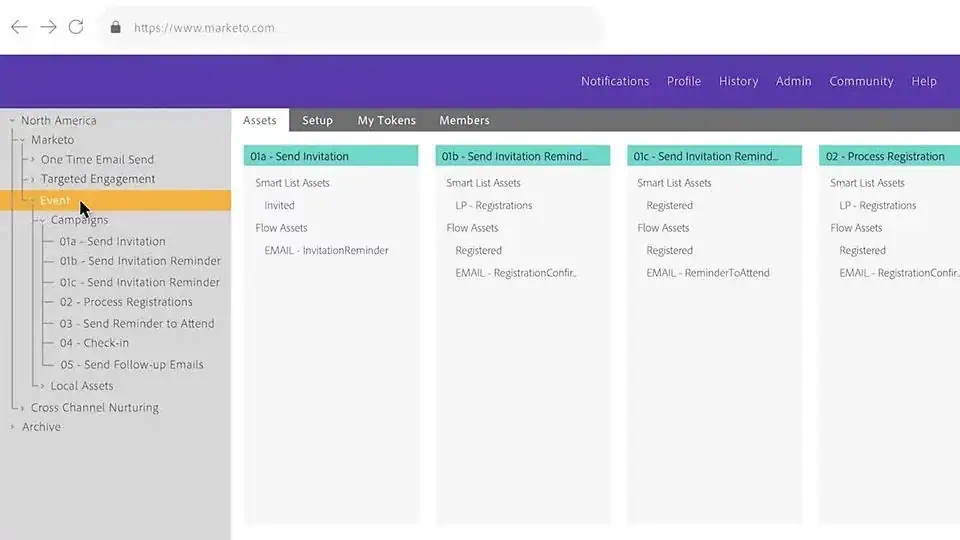
Marketo stands as one of the most robust enterprise marketing automation platforms in the market. It functions like a marketing command center that can handle everything from basic email campaigns to complex, multi-channel orchestrations. It’s particularly known for serving organizations that need deep customization and scalability.
How Marketo and Pardot differ in CRM sync, nurtures, scoring and pricing is in our Marketo vs Pardot comparison.
Software: Marketo Engage
Key Features and Capabilities
- Marketing Campaign Management
- Smart campaign builder
- Advanced segmentation tools
- Dynamic content personalization
- A/B testing capabilities
- Event marketing management
- Lead Management
- Sophisticated lead scoring
- Advanced behavioral tracking
- Interest-based profiling
- Revenue cycle modeling
- Account-based marketing features
- Analytics and Attribution
- Multi-touch attribution
- Revenue cycle analytics
- Performance insights
- Web activity tracking
- ROI reporting
| Features | Growth | Select | Prime | Ultimate |
|---|---|---|---|---|
| Base Price | Based on Database Size – Contact Sales | Based on Database Size – Contact Sales | Based on Database Size – Contact Sales | Based on Database Size – Contact Sales |
| Billing Term | Yearly | Yearly | Yearly | Yearly |
| Included Users | 10 | 25 | 25 | 25 |
| Base Contacts | Based on Database Size | Based on Database Size | Based on Database Size | Based on Database Size |
| Best For | Small teams needing core automation features | Mid-market companies requiring scalable automation | Large enterprises needing advanced capabilities | Global enterprises requiring maximum customization and scale |
Note: Marketo Engage’s pricing is customized based on your specific requirements. Contact their sales team for a detailed quote.
Integration Options
- Native Adobe Experience Cloud integration
- Salesforce CRM bi-directional sync
- Microsoft Dynamics 365 integration
- REST API access
- Webhook support
- Connections to hundreds of tools
Marketo Engage Marketing Automation Software is Best Suited For
- Enterprise-level organizations
- Companies with complex marketing needs
- Businesses requiring deep customization
- Organizations with dedicated marketing ops teams
- B2B companies with long sales cycles
- Teams needing advanced reporting capabilities
Pros and Cons
Pros:
- Extremely powerful automation capabilities
- Highly customizable platform
- Enterprise-grade security
- Robust API and integration options
- Advanced reporting and analytics
- Mature ABM functionality
Cons:
- Steep learning curve
- Requires technical expertise
- Higher price point
- Complex implementation process
- Can be overwhelming for smaller teams
- Interface feels dated compared to newer platforms
Oracle Eloqua
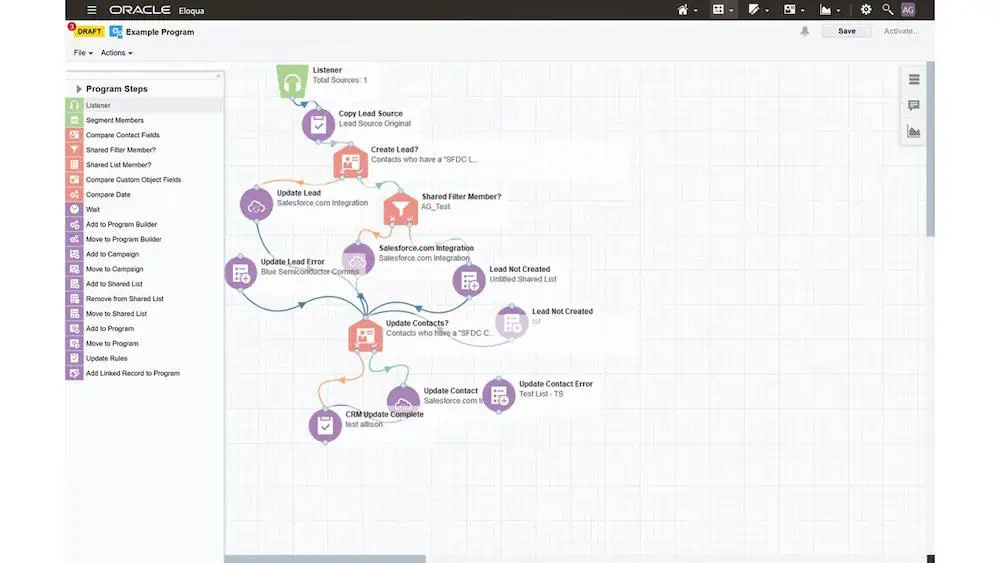
Ever wondered what enterprise-level marketing automation looks like? Oracle Eloqua has been a go-to choice for large enterprises that need robust capabilities and extensive customization options. The platform is particularly known for its strength in managing complex, global marketing operations.
Software: Oracle Eloqua
Key Features and Capabilities
- Advanced Campaign Management
- Visual campaign builder
- Multi-channel orchestration
- Advanced segmentation
- Program templates and canvas
- Global marketing capabilities
- Data Management
- Contact and account scoring
- Custom data modeling
- Advanced segmentation
- Data cleansing tools
- Custom object management
- Enterprise Capabilities
- Multi-language support
- Advanced security features
- Custom object creation
- Field-level tracking
- Advanced workflow automation
| Features | Marketing Basic | Marketing Standard | Marketing Enterprise |
|---|---|---|---|
| Base Price | $2,000/month (Contact Sales) | $4,000/month (Contact Sales) | $29,200/month (Contact Sales) |
| Billing Term | Yearly | Yearly | Yearly |
| Included Users | 10 Marketing Users, 5 Sales Users | 50 Marketing Users, 10 Sales Users | Contact Sales |
| Base Contacts | 10,000 | 10,000 | 500,000 |
| Best For | Small enterprise teams | Mid-size enterprise organizations | Large global enterprises with complex needs |
Note: Oracle Eloqua’s pricing is customized based on your specific requirements. Contact their sales team for a detailed quote.Additional contacts can be purchased.
Integration Options
- Native Oracle CX integration
- Salesforce CRM integration
- Microsoft Dynamics 365
- Custom API access
- Oracle Integration Cloud
- AppCloud marketplace
Oracle Eloqua Marketing Automation Software is Best Suited For
- Large enterprise organizations
- Global companies
- Businesses with complex workflows
- Organizations needing advanced security
- Companies with multiple brands/divisions
- Teams requiring deep customization
Pros and Cons
Pros:
- Enterprise-grade capabilities
- Powerful customization options
- Strong data management
- Advanced security features
- Global marketing support
- Robust integration options
Cons:
- Significant learning curve
- Complex implementation
- Higher price point
- Requires technical expertise
- Can be overwhelming for smaller teams
- Needs dedicated admin resources
ActiveCampaign
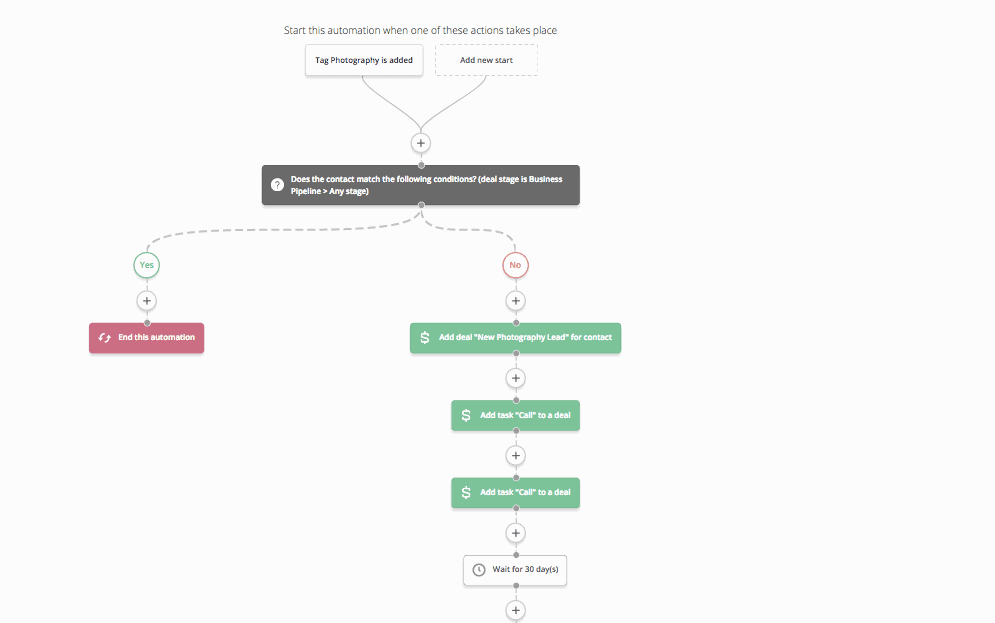
Looking for the sweet spot between power and usability? ActiveCampaign bridges that gap nicely. While it might not be the first name that comes to mind for B2B marketing automation, it’s been steadily gaining ground, especially among mid-market companies that need sophisticated automation without the enterprise complexity.
Software: ActiceCampaign
Key Features and Capabilities
- Marketing Automation
- Visual automation builder
- Split testing capabilities
- Site tracking
- Event tracking
- Predictive content
- Customer Experience
- Sales automation
- Pipeline management
- Win probability
- Customer health scoring
- Attribution reporting
- Personalization Tools
- Dynamic content
- Predictive sending
- Conditional content
- Website personalization
- Custom objects
| Features | Starter | Plus | Pro | Enterprise |
|---|---|---|---|---|
| Base Price (Annual Billing) | $15/month | $49/month | $79/month | $145/month |
| Billing Term | Monthly or Yearly | Monthly or Yearly | Monthly or Yearly | Monthly or Yearly |
| Included Users | 1 | 1 | 3 | 5 |
| Base Contacts | 1,000 | 1,000 | 1,000 | 1,000 |
| Best For | Email marketing basics | Growing businesses | Multi-channel marketing teams | Large organizations needing custom solutions |
Note: Monthly prices shown but billed annually. Monthly billing available at higher rates. Additional contacts can be purchased.
Integration Options
- Native CRM functionality
- Salesforce integration
- Shopify integration
- WordPress plugin
- Zapier connection
- API access
- 1,000+ integrations available
ActiveCampaign Marketing Automation Software is Best Suited For
- Mid-sized businesses
- Growing B2B companies
- E-commerce businesses
- Companies needing CRM integration
- Teams wanting automation without complexity
- Organizations prioritizing value for money
Pros and Cons
Pros:
- Powerful automation capabilities
- User-friendly interface
- Excellent value for features
- Strong email deliverability
- Built-in CRM functionality
- Extensive integration options
Cons:
- Can get expensive with contact scaling
- Learning curve for advanced features
- Limited landing page templates
- Basic reporting in lower tiers
- Email builder could be more flexible
- Limited A/B testing options
Freshmarketer by Freshworks
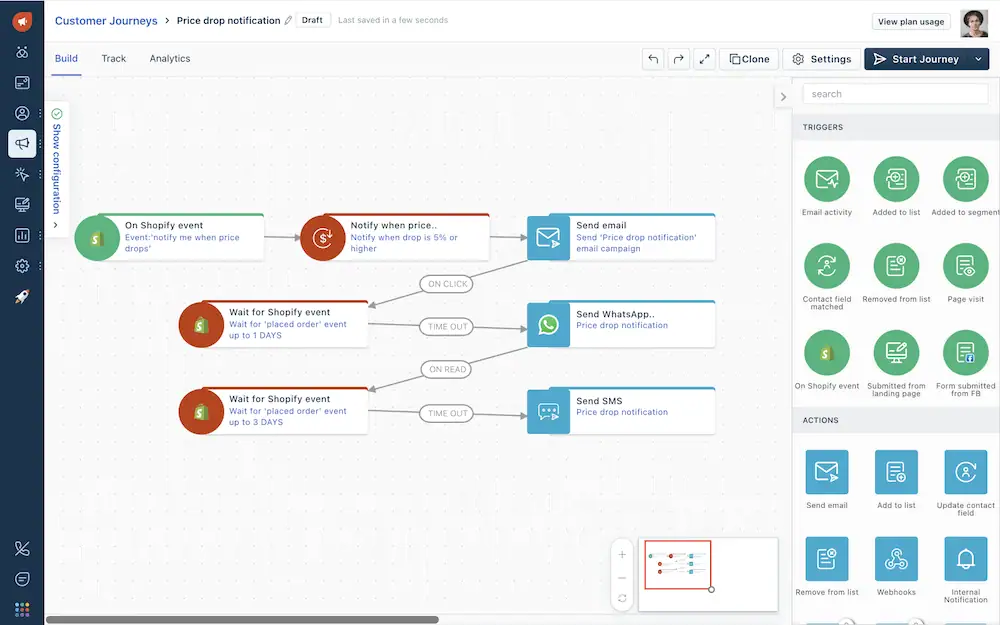
When Freshworks launched Freshmarketer, they brought their signature approach: making enterprise features accessible to growing businesses. If you’ve heard of Freshdesk or Freshsales, you’ll recognize the pattern – sophisticated capabilities wrapped in a user-friendly interface.
Software: Freshmarketer by Freshworks
Key Features and Capabilities
- Journey Builder
- Visual customer journey designer
- Trigger-based automation
- Behavior-based segmentation
- A/B testing capabilities
- Multi-channel campaigns
- Audience Management
- Contact scoring
- Segmentation tools
- List management
- Profile enrichment
- Activity tracking
- Engagement Tools
- Email marketing
- Website tracking
- Chat integration
- Forms & landing pages
- Social media campaigns
| Features | Free | Enterprise |
|---|---|---|
| Base Price (Annual Billing) | $0/month | $15/month |
| Billing Term | N/A | Monthly or Yearly |
| Included Users | Unlimited | Unlimited |
| Base Contacts | 100 | 500 |
| Best For | Small teams testing automation | Large teams needing advanced features |
Note: Monthly prices shown but billed annually. Monthly billing available at higher rates. Additional contacts can be purchased.
Integration Options
- Native Freshworks CRM integration
- Shopify integration
- WordPress plugin
- WhatsApp Business
- Zapier connection
- REST API
Freshmarketer by FreshWorks Marketing Automation Software is Best Suited For
- Small to medium businesses
- Growing startups
- E-commerce companies
- Service-based businesses
- Teams needing simple automation
- Freshworks CRM users
Pros and Cons
Pros:
- User-friendly interface
- Competitive pricing
- Easy implementation
- Good customer support
- Native CRM integration
- Quick learning curve
Cons:
- Limited advanced features
- Basic reporting capabilities
- Fewer integrations than competitors
- Limited customization options
- Email builder could be more flexible
- Contact pricing can add up
Zoho Marketing Automation
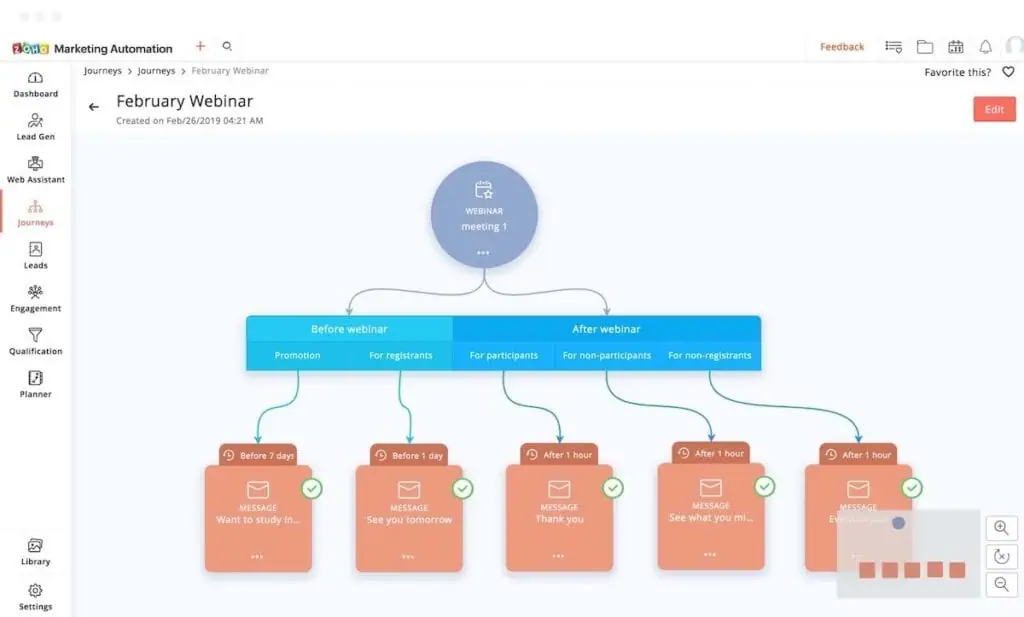
Looking for a cost-effective marketing automation solution that doesn’t skimp on features? Zoho Marketing Automation, part of the extensive Zoho ecosystem, offers a compelling mix of functionality and affordability, especially for businesses already using other Zoho products.
Software: Zoho Marketing Automation
Key Features and Capabilities
- Marketing Automation
- Visual workflow builder
- Multi-channel campaigns
- Website visitor tracking
- Lead scoring and grading
- Dynamic content personalization
- Lead Management
- Progressive profiling
- Lead nurturing
- Engagement tracking
- Predictive lead scoring
- Sales-marketing alignment
- Analytics and Reporting
- Campaign analytics
- Revenue attribution
- Customer journey analytics
- Website analytics
- Custom dashboards
| Features | Standard | Professional | Enterprise |
|---|---|---|---|
| Base Price (Annual Billing) | $14/month | $22/month | $44/month |
| Billing Term | Monthly or Yearly | Monthly or Yearly | Monthly or Yearly |
| Included Users | 10 | 15 | 25 |
| Base Contacts | 1,000 | 1,000 | 1,000 |
| Best For | Small teams starting with automation | Growing marketing teams | Large teams needing advanced features |
Note: Monthly prices shown but billed annually. Monthly billing available at higher rates. Additional contacts can be purchased.
Integration Options
- Native Zoho CRM integration
- Zoho ecosystem apps
- Google Workspace
- Microsoft 365
- WordPress
- Shopify
- REST API access
Zoho Marketing Automation Software is Best Suited For
- Small to medium businesses
- Zoho CRM users
- Budget-conscious teams
- Growing marketing teams
- B2B companies
- E-commerce businesses
Pros and Cons
Pros:
- Competitive pricing
- Strong Zoho ecosystem integration
- Comprehensive feature set
- User-friendly interface
- Good value for money
- Built-in CRM capabilities
Cons:
- Limited third-party integrations
- Basic reporting in lower tiers
- Learning curve for advanced features
- Limited template options
- Email builder could be more flexible
- Support response times vary
Mailchimp Marketing Automation
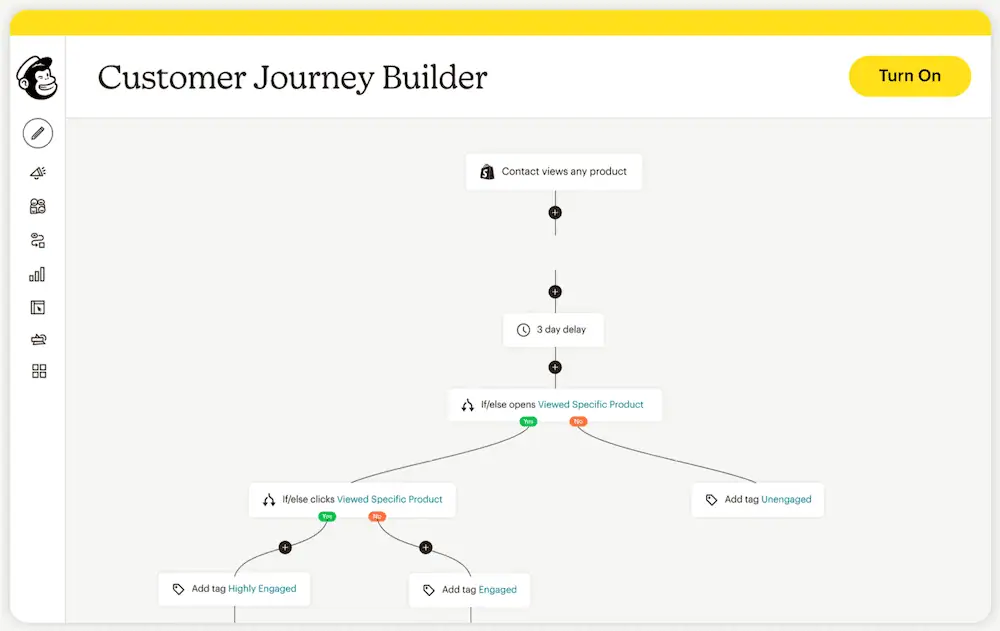
When you think of email marketing, Mailchimp probably comes to mind first. But here’s something interesting: they’ve evolved far beyond their email roots into a full-fledged marketing automation platform. While they might not be the first choice for complex B2B operations, their automation capabilities might surprise you.
Software: Mailchimp Marketing Automation
Key Features and Capabilities
- Marketing Automation
- Customer journey builder
- Behavioral targeting
- Transactional emails
- Predictive analytics
- Website visitor tracking
- Campaign Management
- Multi-channel campaigns
- A/B testing
- Dynamic content
- Social media posting
- Content optimization
- Customer Data Platform
- Audience segmentation
- Customer profiles
- Predictive insights
- Purchase likelihood
- Behavioral analytics
| Features | Free | Essentials | Standard | Premium |
|---|---|---|---|---|
| Base Price (Annual Billing) | $0 | $13/month | $20/month | $350/month |
| Billing Term | N/A | Monthly | Monthly | Monthly |
| Included Users | 1 | 3 | 5 | Unlimited |
| Base Contacts | 250 | 500 | 500 | – |
| Best For | Startups and solopreneurs | Small businesses needing basics | Growing businesses | Large businesses needing advanced features |
Note: Monthly prices shown but billed annually. Monthly billing available at higher rates. Additional contacts can be purchased.
Integration Options
- Native website builder
- Shopify integration
- WooCommerce plugin
- Square integration
- WordPress plugin
- Zapier connection
- API access
Mailchimp Marketing Automation Software is Best Suited For
- Small to medium businesses
- E-commerce companies
- Content creators
- Digital agencies
- Retail businesses
- Growing startups
Pros and Cons
Pros:
- User-friendly interface
- Strong email deliverability
- Generous free plan
- Built-in design tools
- Extensive template library
- Good analytics features
Cons:
- Gets expensive with contact growth
- Limited automation in lower tiers
- Basic segmentation options
- CRM features are basic
- Complex pricing structure
- Limited B2B features
Comparison Matrix and Analysis
After diving deep into each platform’s capabilities, let’s look at how they stack up against each other across key criteria that matter most to B2B organizations.
Feature Comparison
| Feature | Pardot | HubSpot | Marketo | Oracle Eloqua | ActiveCampaign | Freshmarketer | Zoho | Mailchimp |
|---|---|---|---|---|---|---|---|---|
| Lead Scoring | Advanced | Advanced | Advanced | Advanced | Good | Basic | Good | Basic |
| Email Marketing | Advanced | Advanced | Advanced | Advanced | Advanced | Good | Good | Advanced |
| B2B Focus | Very High | High | Very High | Very High | Moderate | Moderate | High | Low |
| CRM Integration | Native Salesforce | Native HubSpot | Multiple | Multiple | Multiple | Native Fresh | Native Zoho | Limited |
| AI Capabilities | Advanced | Advanced | Advanced | Advanced | Good | Basic | Good | Basic |
| Account-Based Marketing | Native | Add-on | Native | Native | Limited | Basic | Good | No |
| Implementation Complexity | High | Medium | High | Very High | Low | Low | Medium | Low |
| Learning Curve | Steep | Moderate | Steep | Very Steep | Gentle | Gentle | Moderate | Gentle |
Integration Capabilities
| Category | Pardot | HubSpot | Marketo | Oracle Eloqua | ActiveCampaign | Freshmarketer | Zoho | Mailchimp |
|---|---|---|---|---|---|---|---|---|
| Native CRM | Salesforce Only | HubSpot CRM | Multiple | Multiple | Built-in CRM | Fresh CRM | Zoho CRM | Basic CRM |
| API Access | Full API | Full API | Full API | Full API | Full API | Basic API | Full API | Full API |
| Third-Party Integrations | Moderate | Extensive | Extensive | Extensive | Extensive | Limited | Good | Extensive |
| Custom Development | Advanced | Advanced | Advanced | Advanced | Limited | Limited | Good | Limited |
Scalability Assessment
| Category | Pardot | HubSpot | Marketo | Oracle Eloqua | ActiveCampaign | Freshmarketer | Zoho | Mailchimp |
|---|---|---|---|---|---|---|---|---|
| Small Business | Good | Excellent | Limited | Limited | Excellent | Good | Excellent | Excellent |
| Mid-Market | Excellent | Excellent | Good | Good | Good | Good | Good | Good |
| Enterprise | Excellent | Good | Excellent | Excellent | Limited | Limited | Good | Limited |
| Global Enterprise | Good | Limited | Excellent | Excellent | Limited | Limited | Limited | Limited |
Key Findings from Our Analysis:
- B2B Functionality
- Pardot, Marketo, and Eloqua lead in B2B-specific features
- HubSpot and Zoho offer strong B2B capabilities with better usability
- ActiveCampaign, Freshmarketer, and Mailchimp are more B2C-focused
- Implementation and Learning Curve
- HubSpot offers a balanced approach to features and usability
- Eloqua and Marketo require the most extensive training
- ActiveCampaign, Freshmarketer, and Mailchimp are easiest to get started with
- Pardot sits in the middle, requiring moderate technical expertise
- Integration Capabilities
- Enterprise solutions (Pardot, HubSpot, Marketo, Eloqua) offer the most robust integration options
- Mid-market solutions (Zoho, ActiveCampaign) provide good integration capabilities
- Entry-level solutions (Freshmarketer, Mailchimp) offer basic but sufficient integrations
- Scalability
- Eloqua and Marketo excel at enterprise and global scale
- HubSpot and Pardot dominate the mid-market
- ActiveCampaign, Freshmarketer, and Mailchimp are ideal for small to medium businesses
- Zoho offers good scalability within its ecosystem
Industry-Specific Considerations
Not all industries have the same marketing automation needs. Let’s explore key considerations based on different business types and verticals.
Enterprise vs. Mid-Market Solutions
Enterprise Requirements
- Multi-regional capabilities
- Advanced security features
- Complex workflow automation
- Custom object support
- Advanced user permissions
- Extensive API access
Mid-Market Needs
- Cost-effective scaling
- Easy implementation
- Standard automation features
- Basic security features
- Straightforward user management
- Standard API access
Industry Vertical Requirements
Let’s look into some key industries, what to consider and what we recommend.
| Industry | Key Requirements | Recommended Platforms | Special Considerations |
|---|---|---|---|
| Technology/SaaS | – Product usage tracking – Trial management – Complex nurture flows | – Marketo – HubSpot – Pardot | – Integration with product analytics – Free trial automation – User onboarding flows |
| Manufacturing | – Distributor management – Complex sales cycles – Multi-stakeholder journeys | – Pardot – Oracle Eloqua – Marketo | – ERP integration – Dealer portal integration – Quote management |
| Healthcare | – HIPAA compliance – Patient journey mapping – Secure communications | – Oracle Eloqua – Marketo – Pardot | – Data privacy – Regulatory compliance – Patient confidentiality |
| Financial Services | – Compliance features – Secure data handling – Multi-product campaigns | – Pardot – Oracle Eloqua – Marketo | – Financial regulations – Data security – Multi-product marketing |
Compliance and Security Considerations
Data Privacy Requirements
- GDPR compliance
- CCPA compliance
- Data residency options
- Cookie consent management
- Privacy policy enforcement
- Data retention controls
Security Features to Consider
- Single Sign-On (SSO)
- Two-Factor Authentication
- IP whitelisting
- Encryption standards
- Audit logging
- Role-based access
Compliance Documentation
- Security certifications
- Compliance documentation
- Data processing agreements
- Vendor assessment reports
- Security whitepapers
- Implementation guides
How to Choose the Right Marketing Automation Software
Making the leap to a new marketing automation platform is a significant decision. Let’s break down the key factors you need to consider to make the right choice for your organization.
Assessment Framework
Before you start evaluating specific platforms, you need to have a clear picture of your requirements and constraints. Here’s a structured approach to assess your needs:
Budget Considerations
- Initial platform costs
- Implementation and training costs
- Additional user licenses
- Contact tier pricing
- Integration costs
- Ongoing maintenance
Technical Requirements
- CRM integration needs
- Required automation complexity
- Data migration requirements
- Security and compliance needs
- API requirements
- Custom development needs
Team Capabilities
- Current technical expertise
- Resources for implementation
- Training requirements
- Team size and structure
- Marketing operation maturity
- Available IT support
Growth Projections
- Contact database growth
- User license requirements
- Feature requirements over time
- Geographic expansion plans
- Multi-brand considerations
- Budget scalability
Implementation Best Practices
The success of your marketing automation platform heavily depends on proper implementation. Here are key considerations:
- Phased Implementation
- Start with core features
- Gradually add complexity
- Test thoroughly at each stage
- Document processes
- Train team members progressively
- Data Migration Strategy
- Audit existing data
- Clean and standardize data
- Map fields correctly
- Test with sample data
- Validate after migration
- Integration Planning
- Map integration requirements
- Plan authentication methods
- Document data flows
- Test integration scenarios
- Monitor performance
- Documentation
- Maintain detailed compliance records
- Document security configurations
- Keep audit trails
- Update process documentation
- Training
- Regular security training
- Compliance awareness
- Process adherence
- Best practices
- Monitoring
- Regular security audits
- Compliance checks
- Usage monitoring
- Performance tracking
ROI Calculation Guide
Understanding the potential return on investment is crucial. Here’s how to calculate it:
- Cost Factors
- Platform subscription
- Implementation costs
- Training expenses
- Integration costs
- Maintenance fees
- Benefit Metrics
- Time saved on manual tasks
- Improved lead conversion rates
- Increased customer lifetime value
- Better campaign performance
- Enhanced team productivity
- ROI Formula
ROI = (Total Benefits - Total Costs) / Total Costs × 100
Consider these timeframes for ROI calculation:
- Short-term (3-6 months)
- Medium-term (6-12 months)
- Long-term (12+ months)
Pro Tip: Factor in both quantitative and qualitative benefits when calculating ROI. Some benefits, like improved customer experience or better brand consistency, are harder to quantify but equally important. For the part you can count, our marketing ROI calculator puts costs and revenue side by side.
Frequently Asked Questions
Still have questions about marketing automation software? Here are answers to the most common queries we receive.
What is the average cost of B2B marketing automation software?
The cost varies significantly based on your needs and chosen platform:
- Entry-level solutions: $200-500/month
- Mid-market platforms: $1,000-3,000/month
- Enterprise solutions: $4,000+/month
Remember that these prices typically don’t include implementation costs, additional users, or extra contacts. Always factor in the total cost of ownership, including training and integration expenses.
How long does implementation typically take?
Implementation timeframes vary by platform complexity and your requirements:
- Basic Setup: 2-4 weeks
- Email templates
- Basic workflows
- CRM integration
- User training
- Standard Implementation: 1-3 months
- Custom workflows
- Advanced integrations
- Data migration
- Team training
- Enterprise Implementation: 3-6 months
- Complex workflows
- Multiple integrations
- Custom development
- Global rollout
Can marketing automation software integrate with existing CRM systems?
Yes, but integration capabilities vary by platform:
- Native Integrations
- Pardot → Salesforce (native)
- HubSpot → HubSpot CRM (native)
- Marketo → Multiple CRMs
- Oracle Eloqua → Multiple CRMs
- Third-Party Integrations
- Through APIs
- Via middleware
- Using integration platforms
What technical expertise is required for implementation?
Required expertise varies by platform and implementation scope:
Basic Implementation
- Marketing automation basics
- Email marketing knowledge
- Basic HTML/CSS
- CRM understanding
Advanced Implementation
- JavaScript
- API knowledge
- Database management
- Integration experience
Enterprise Implementation
- Development experience
- Systems architecture
- Security protocols
- Advanced integrations
Conclusion
Choosing marketing automation software is a decision that can shape how your business grows. There’s no one-size-fits-all solution, so let your specific needs, budget and growth plans guide the choice:
- Enterprise-Level Needs: Consider Pardot, Marketo, or Oracle Eloqua
- Mid-Market Requirements: Look into HubSpot, Pardot, or Zoho
- Growing Businesses: Explore ActiveCampaign or Freshmarketer
- Small Business Needs: Start with Mailchimp and scale up
Success with any platform depends on proper implementation, team training and strategic use as much as on the tool itself.
Need Help Making Your Decision?
At ConvertPilot, we specialize in helping B2B companies choose and implement the right marketing automation. Our expertise is Pardot (Marketing Cloud Account Engagement) and Marketing Cloud Next. Our team can help you:
- Assess your specific requirements
- Compare suitable platforms
- Plan implementation strategy
- Ensure successful adoption
- Maximize ROI
Book a free consultation with our experts to work through the selection process and build a roadmap for a successful implementation.


