
Lead Scoring Template and Model Builder
Set points for what prospects do and grades for who they are, then watch five sample prospects pass or fail your MQL rule. Download your model as a CSV template. Free, no sign-up, nothing stored.
The builder needs JavaScript. Pardot’s default points and the grading scale are below.
Score for Interest, Grade for Fit
A score adds up what a prospect does: forms, page views, email clicks. A grade says how well the prospect matches your ideal customer, from A+ to F.
Pardot keeps both. New prospects start at grade D, and each criterion moves the grade by a third of a letter. Sales gets a lead when both pass, which is why a busy student never reaches them.
The model in five rules
- Score = points × actions, summed
- Decay = points off for every period without activity
- Grade = D, ⅓ letter up per match, down per miss
- Scale = F, D-, D, D+ … A-, A, A+ (13 steps)
- MQL = score at least X and grade at least Y
Start From a Ready Template
Each loads a full model into the builder as a starting point.
- Template
Pardot’s Default Points
The scoring rules every Pardot account starts with. The student downloading everything outscores your best lead.
- +50form submission
- +1page view
- +3email click
- Demo-Led
Demo-Led B2B
A demo request counts most, careers visits and unsubscribes take points off, 10 points decay a month.
- Content
Content-Heavy Marketing
Webinars and downloads count more, the MQL score sits higher to make up for it.
- ABM
Strict Fit for Target Accounts
Fit weighs most: a lower score threshold, but grade B+ or better.
- What If
Decay Switched Off
The demo-led model without decay. Watch the attendee who went quiet four months ago.
Four Kinds of Prospects
Score and grade together sort every prospect into one of four groups. Each needs a different next step.
High Score, Good Grade
Active and a fit: an MQL. Assign to sales and agree how fast they follow up.
High Score, Poor Grade
Active but not a fit: students, job seekers, competitors. Check them before sales sees them.
Low Score, Good Grade
A fit who hasn’t engaged yet. Nurture with content for their role and industry.
Low Score, Poor Grade
Neither active nor a fit. Keep them on your lists, spend no sales time.
Build Your Model in Pardot
Four steps from this template to scores sales can trust.
- 1
Set the Scoring Rules
Change the default points in Account Engagement’s scoring settings. Negative numbers take points off; editing the rules rescores every prospect.
- 2
Set Up the Grading Profile
Every account has a default profile with five criteria: company size, industry, location, job title and department. Set how far a match or a miss moves the grade.
- 3
Add Decay
Pardot has no decay setting. An automation rule or an Engagement Studio program takes points off prospects without recent activity.
- 4
Hand Over to Sales
An automation rule assigns prospects with your score and grade to sales. Trailhead suggests 100 and B- as a starting point.
A Score for Each Product Line
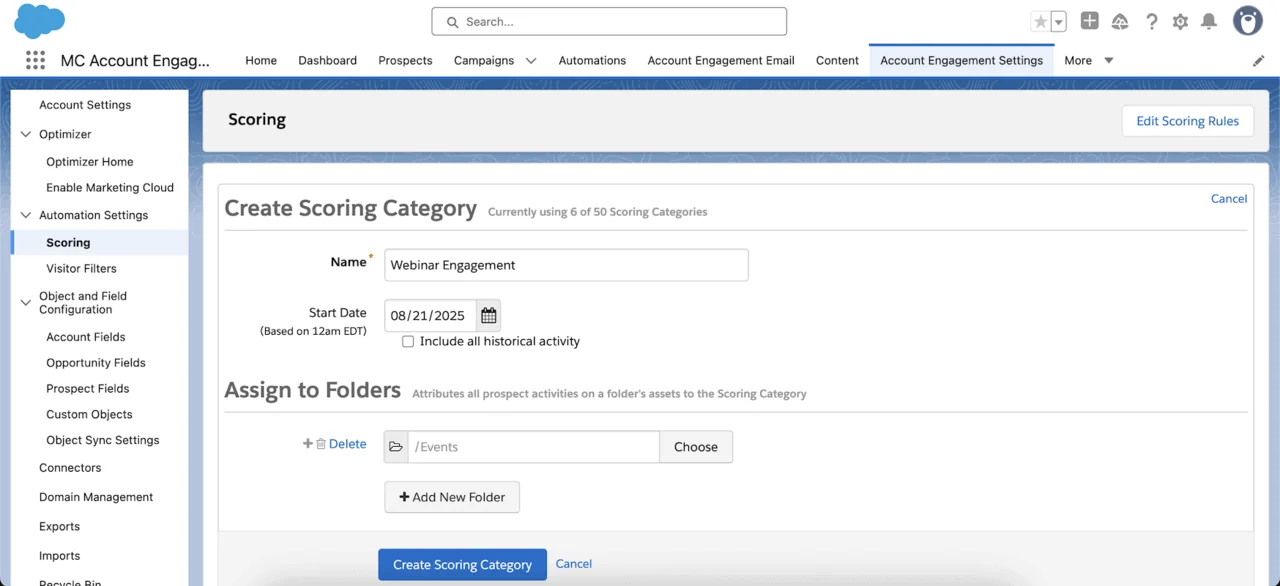
With scoring categories, Pardot keeps a separate score per folder of assets, so a prospect can be hot for one product and cold for another. They come with Plus, Advanced and Premium, up to 50 categories.
Einstein Behavior Scoring adds a 0 to 100 score from Salesforce’s own model, in Advanced and Premium. Marketing Cloud Next scores engagement and fit from 0 to 100 on Data 360 (formerly Data Cloud) instead of letter grades.
- Scoring categories: one per folder, up to 50
- Einstein Behavior Scoring: at least 6 months of data and 20 prospects linked to opportunities
- Marketing Cloud Next: up to 30 engagement and 30 fit rules
Lead Scoring Template FAQ
Short answers to what people ask about lead scoring and grading.
What is a lead scoring model?
A set of rules that turns what a prospect does and who they are into numbers: points for actions such as form submissions and page views, and a fit rating such as a grade. Above an agreed threshold, the lead goes to sales.
What are Pardot’s default scoring points?
Form submissions, form handler submissions and landing page successes add 50, page views 1, email clicks, file access and custom redirect clicks 3. Email opens add 0, a lost opportunity takes off 100. You can change every rule.
What is the difference between scoring and grading?
The score measures interest from activity; the grade measures fit from profile data such as job title, industry and company size. Pardot grades run from A+ to F, start at D and move a third of a letter per criterion.
What score should make a lead an MQL?
There is no standard number. Salesforce’s Trailhead suggests starting at a score of 100 and a grade of B-, then adjusting once sales has worked the first leads. Test your rule on the sample prospects above.
Does Pardot have score decay?
Not as a setting. Teams build decay with an automation rule or an Engagement Studio program that takes points off after a period without activity. Editing the scoring rules later rescores prospects and can undo it.
Is my model stored?
No. The builder runs in your browser and the sample prospects are made up. Nothing you enter is sent to us or to analytics. The share link keeps your model after the #, a part of the address browsers never send to a server.
More Free Tools
We Make Salesforce Marketing Work for You
Talk to a certified consultant, not a salesperson, and leave the first call knowing your next step.