Pardot Scoring Explained for Smarter Lead Qualification
Learn how Pardot scoring works and how to customize it for smarter lead qualification that drives more data-backed sales engagement.

Pardot scoring (now Salesforce Account Engagement) is a foundational piece of lead qualification. When applied strategically, it helps marketing and sales teams move beyond gut feeling into data-driven decisions.
This article unpacks how Pardot Score works, how it adjusts, how to customize it, and how to prevent it from becoming inflated or noisy. Whether you’re trying to optimize lead handoff or understand engagement trends, mastering Pardot Score is a critical step in refining your B2B marketing operations.
- Pardot Score adds points for each interaction, such as email clicks, downloads or form fills.
- Changes to the default scoring model are retroactive and can trigger automations.
- Scoring categories track engagement per product or topic and are tied to folders.
- Pardot has no built-in score decay: build it with an automation rule, for example minus 10 points after 60 days without activity.
- Einstein Behavior Score uses machine learning to score engagement patterns from 0 to 100.
What Is Pardot Score?
Pardot Score is a numeric representation of a prospect’s engagement with your marketing efforts. Each digital interaction – like clicking an email, downloading a whitepaper, or filling out a form – adds points to the prospect’s score.
This offers a clear, quantitative view of how engaged a lead is with your brand’s assets. However, interpreting that number meaningfully requires a good setup, maintenance, and internal alignment on what scores actually indicate.
Why It Matters
Pardot Score isn’t just a vanity metric. Done right, it becomes the backbone of your lead qualification process:
- Determining sales readiness: Higher scores suggest greater engagement and potential purchase interest.
- Prioritizing outreach: Sales teams can focus on prospects with a higher likelihood to convert.
- Segmenting leads: Create smarter campaigns by grouping prospects based on engagement level.
Pairing Score with Grading – which evaluates a lead’s fit – gives you a well-rounded picture of both interest and intent.
How Pardot Score Changes
Several mechanisms control how a score increases, decreases, or stays the same. Understanding each method ensures your scoring logic remains clean and intentional.
1. Default Scoring Model
Out of the box, Pardot applies a baseline set of values to common actions. For example:
- Email open → 1 point
- Email click → 3 points
- Form submission → 50 points
This default model is immediately active and applies to all accounts unless customized.
2. Automation-Based Adjustments
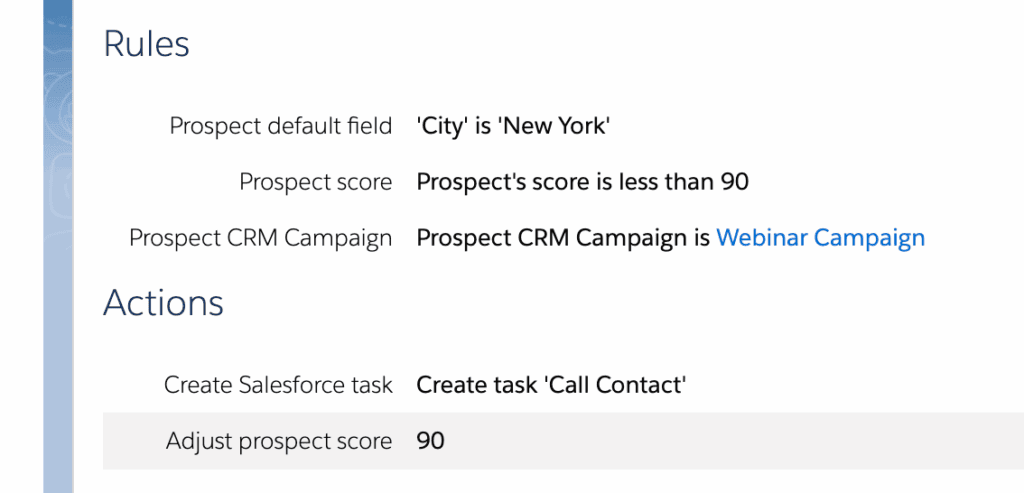
Custom automation can override or supplement default logic. You can increase or decrease scores by setting up:
- Completion actions on forms, files, emails
- Automation rules with “Adjust prospect score by” actions
This allows greater precision – like scoring event registrations higher than a standard webpage visit.
3. Manual Score Changes
Admins can directly update a prospect’s score from their record. While this is possible, use it sparingly as it can disrupt standardized processes and lead comparison.
Where to Find Pardot Score
To make use of scoring, ensure visibility across systems:
- Pardot Prospect Records: Appears by default.
- Pardot Prospect Table: Shows score alongside other prospects for quick comparisons.
- Salesforce Lead/Contact Records: Add the “Pardot Score” field to layouts and list views.
Editing the Default Scoring Model
If the default values don’t match your engagement priorities, you can edit them. Navigate to:
- Pardot Settings → Automation Settings → Scoring
Be mindful:
- Changes are retroactive: Updated values apply to past activities in a prospect’s history.
- It can trigger automation: If automation fires when a prospect hits 100 points, changing values may push inactive leads over the threshold unintentionally.
Using Scoring Categories
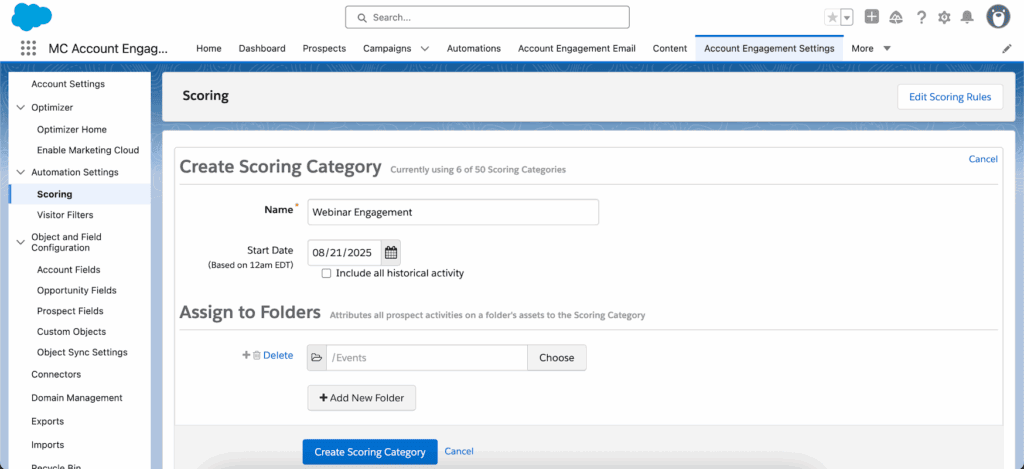
Sometimes, a single score isn’t enough – especially if your business has multiple products or services. Scoring Categories let you track engagement by topic or business unit.
Example categories might include:
- Product A
- Product B
- Webinar Engagement
To implement, go to:
- Pardot Settings → Automation Settings → Scoring → Add Scoring Category
Setting Up Score Decay
Engagement should decrease when leads go silent. Pardot doesn’t include score decay out of the box, but you can build it using automation.
For example, set an automation rule to:
- Find prospects with no activity in 60 days
- Decrease score by 10 points
Repeating this monthly ensures scores reflect recency of engagement – not just total historical activity.
Planning Scoring Structures
A well-structured scoring framework avoids common pitfalls – like double-counting or conflicting logic:
Watch Out For:
- A form submission adds 50 points by default – but if a completion action adds 50 more, that’s 100 points for one action.
- Conflicting rules: Don’t simultaneously increase and decrease a score for the same action.
Document your scoring logic thoroughly and review it regularly with both marketing and sales stakeholders.
How to Pause Pardot Score Changes
If prospects are quickly accumulating irrelevant data – or you need to pause scoring during cleanup – there are two options:
1. Pause Activity Tracking
- Ideal for high-traffic test records or bot-initiated sessions
- Stops future activity logging, but keeps score history intact
- Use with caution, and clearly label paused records
2. Use the Recycle Bin
- Prospects in the recycle bin don’t accumulate activity or score changes
- Their data is restored if they re-engage (e.g., fill out a form)
This method functions like soft-deactivation and is useful for dormant or duplicate records.
Einstein Behavior Score: Smarter Lead Engagement
For teams ready to go beyond static rules, Einstein Behavior Score uses machine learning to detect meaningful combinations of engagement patterns.
How It Works
- Analyzes historical data to learn which combinations of actions lead to closed deals
- Assigns a behavior score (0-100) based on pattern confidence
- Normalizes scores across your full database, reducing bias and extreme outliers
This makes your scoring system adaptive instead of fixed, and helps surface high-intent leads more dynamically.
Final Thoughts
Pardot Score gives you an essential lens into how your leads are interacting with your brand. But it’s only as useful as it is intentional. Left unstructured, scores can become inflated, noisy, and unreliable. With custom scoring models, scoring categories, and automation rules (including decay), you can build a system that reflects your unique buyer signals – with clarity and confidence.
If you’re ready to bring more accuracy and accountability to your lead qualification, get in touch with us. We’re here to help you build and refine a scoring framework that scales alongside your business goals.