Pardot Troubleshooting Tips to Fix Sync and Automation Issues
Struggling with Pardot sync or automation issues? Learn proven Pardot troubleshooting tips to fix errors fast and keep campaigns on track.

When things go wrong in Account Engagement (Pardot), it can feel like you’re digging for clues in the dark. A field won’t sync. A rule doesn’t fire. Thousands of sync errors appear overnight. If you’re unsure where an issue originated, knowing where and how to start troubleshooting is crucial.
In this article, we’ll walk through four tried-and-true techniques that can help you investigate, isolate, and resolve Pardot issues efficiently – so your pipelines (and your sanity) stay intact.
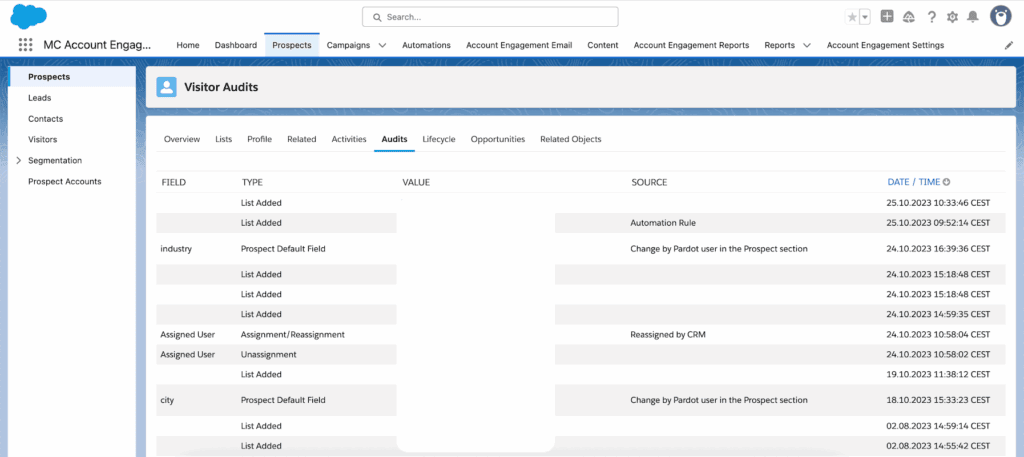
- Start every investigation in the prospect’s Audits tab: it logs each change with its source and time.
- Check the sync behavior of the problem field and the Salesforce connector’s sync errors.
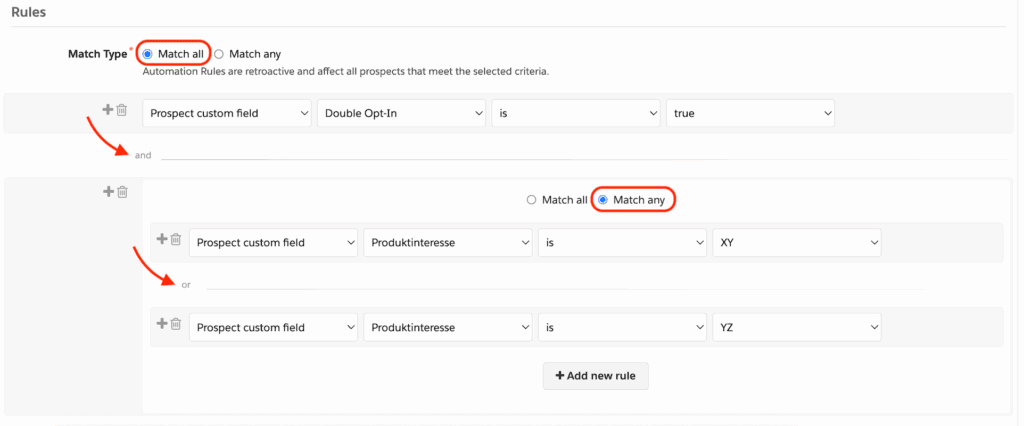
- Pick the right match type in automation rules: Match All (AND) or Match Any (OR).
- For patterns across many records, export the data and analyze it in a spreadsheet with pivot tables.
- When you’re stuck, contact Account Engagement support and compare notes with other Pardot users.
The Audits Tab: Your Troubleshooting Launchpad
The first place you should check when something appears broken is the Audits tab within the prospect record. Think of this as your system’s black box – everything a prospect has done or experienced in Pardot is logged here, down to the minute.
Why It Matters
Whether a field didn’t update or an email didn’t send, start by finding an example prospect affected by the issue and reviewing their audits. This log offers clues about when an action occurred and what automation triggered it. This can be foundational in reverse-engineering the malfunction.
How to Access
- Go to the prospect’s record in the Account Engagement Lightning App.
- Click on the Audits tab to open the audit history.
Key Areas to Examine
- Top Audit Timeline: Shows specific changes and their timestamps, offering critical context for what happened just before or after the issue.
- Automation Rules: If a prospect matched a rule, it will display here – even those that have been deleted (marked as “[Deleted]”). Maintain an offline log of automation rules for future reference.
- Engagement Studio Membership: Track which programs the prospect has participated in and match actions with program steps during error windows.
- Imports: Prospects might be imported multiple times. Each import can trigger field changes that you need to track for root cause discovery.
Field Sync Behavior and Salesforce Connector Errors
Misaligned data between Pardot and Salesforce often stems from field configuration or sync behavior issues. This area is friction-prone – but also solvable with targeted investigation.
Prospect Fields Setup
Navigate to Settings > Object and Field Configuration > Prospect Fields in Account Engagement. Select the problematic field and assess:
- Sync Behavior: Does Salesforce overwrite Pardot, or vice versa? Misalignment can lead to unexpected results.
- Field API Name Consistency: Ensure the API name matches what exists in Salesforce.
Common Misconfigurations
- Field marked as “Do not sync” when it should sync
- Conflicting sync behavior causing data writebacks to fail
- Duplicate or deprecated fields in use on forms or automation
Investigating Sync Errors
To view sync issues:
- Go to Settings > Connectors
- Click on the action cog beside the Salesforce connector
- Select Sync Errors from the dropdown
These logs are descriptive – they’ll usually tell you exactly what’s wrong (field type mismatch, missing value, permissions error). For large volumes of errors, consider exporting them or organizing them via static lists for easier triage.
Match Type in Automation Rules
This is one of the most deceptively simple traps in Pardot: incorrect match type in automation rules. Get this wrong, and you’ll be scratching your head while wondering why only half your prospects are being processed.
Understanding Match Logic
If you’re using multiple rule criteria, your “match type” determines which prospects qualify based on those conditions:
- Match Any (OR logic): Use this when your rules describe positive conditions (e.g., “Prospect is XYZ”).
- Match All (AND logic): Use this when your rules are phrased as negatives (“Prospect isn’t XYZ”).
A useful trick is to say the rule out loud. It helps uncover flawed logic, especially when it’s stacked with AND/OR conditions. (Fair warning – this may turn a few heads if you’re in a shared workspace.)
Common Scenarios Where This Matters
- Using “Match Any” with contradictory negative clauses
- Expecting a rule to trigger but combining too many strict ALL-conditions that exclude valid prospects
Full Data Export for Deep-Dive Analysis
When all else fails, sometimes the best strategy is to perform a complete data export, especially for form submissions, field values, or automation processing. This gives you the ability to work offline with spreadsheets and manipulate data for trend patterns or outliers.
Tips for Efficient Analysis
- Use pivot tables to group by fields such as source campaign, date modified, or custom criteria.
- Strip unnecessary columns to focus your investigation on relevant data points.
- Search for anomalies like inconsistent timestamps or unpopulated fields across comparable records.
This level of analysis is often what reveals hidden culprits like duplicate imports, field mapping inconsistencies, or outdated logic in automation flows.
Seek Help – and Collaborate
Finally, don’t troubleshoot in a vacuum. If you’ve exhausted self-service debugging, reach out to your Account Engagement support channel. Depending on your edition, the level of Salesforce assistance may vary – but the support team can often surface problems that aren’t apparent in the UI.
Even more practical: talk to other internal Pardot and Salesforce users. Sometimes what feels like a technical bug is actually a gap in logic or intent – and alternative perspectives can break that loop faster than going it alone.
Wrap-Up
Effective troubleshooting in Account Engagement comes down to methodically examining the data, following audit trails, understanding function logic, and keeping field configurations in check. Whether it’s automation rules misfiring or sync errors piling up, each clue brings you closer to the resolution – and better prepared to prevent future issues.
If you’re running into complexities with Pardot and want structured support from a partner who understands both the platform and your business goals, get in touch with ConvertPilot. We’re here to help you navigate the most intricate use cases confidently.