Optimizing Pardot for Salesforce Architects Made Simple
Learn how to optimize Pardot for Salesforce architecture to boost performance, scalability, and marketing automation efficiency.

As marketing automation becomes central to B2B go-to-market strategy, aligning platforms like Account Engagement (formerly Pardot) with Salesforce architecture is more important than ever. Whether you’re an enterprise architect or marketing leader, optimizing Pardot within Salesforce requires a deep understanding of its evolving integration with core CRM systems.
This guide explores how to architect Pardot for performance, scalability, and maintainability – leveraging Salesforce’s Well-Architected Framework to ensure systems are resilient, fast, and aligned with business goals.
- Account Engagement now lives inside Salesforce, which brings new questions for data model, throughput, connector behavior and user access.
- For throughput, avoid redundant automations and excessive segmentation rules, and know how batch processing handles updates.
- Business units segment campaigns, prospects and assets, which suits global or multi-brand setups.
- Know the risks, such as AMPSEA linking activity to the wrong record, and plan how to mitigate them.
- Run the Account Engagement Optimizer routinely and keep an eye on sync errors.
Understanding Account Engagement in a Salesforce Context
Originally a standalone platform, Account Engagement has steadily migrated into the Salesforce ecosystem. While that brings tighter integration, it also introduces new architectural considerations for data modeling, system throughput, connector behavior, and user access controls.
Key Terminology in the Pardot Data Model
- Prospects: Identified individuals tracked in Pardot. Their activity contributes to engagement signals.
- Visitors: Anonymous users tracked via the tracking code, converted to prospects upon form completion or identification.
- Assets: Marketing resources like forms, emails, lists, and landing pages.
- Campaigns: Now unified via Connected Campaigns with Salesforce’s campaign object.
A Seamless But Quirky Connector
The Salesforce-Pardot connector is the lifeline between your CRM and marketing automation engine. Key behaviors include:
- Automatic deletion of Pardot prospects when their associated lead/contact is deleted in Salesforce.
- Field-level sync rules, such as “most recently updated”, which apply to the entire record – not individual fields.
- Syncing in batches (e.g., 200 prospects at a time) for scalability but at the cost of real-time responsiveness.
Custom Object Syncing Constraints
Advanced editions enable syncing up to four custom objects – but only with a valid lookup to leads, contacts, or accounts. Without this model alignment, workarounds can lead to brittle automation and metadata inconsistencies.
Optimizing Throughput: Architecting for Scale
Throughput optimization is about handling high volumes of concurrent operations efficiently. In the context of Pardot, this refers to:
- Minimizing system strain from redundant automations or excessive segmentation rules.
- Understanding how batch processing handles updates (e.g., connector syncs, segmentation).
- Using tools like the Account Engagement Optimizer for automation audits.
Bulkification and Email Processing
- Prospect record syncs occur in batches of 200 using the connector.
- Email list sends go through a three-step processing queue – usually completed in under 30 minutes.
- Autoresponder and form-completion emails are throttled to maintain performance.
Segmentation at Scale
| Automation Type | Query Scope |
|---|---|
| Automation rules | Entire database |
| Completion actions | Subset (prospects engaging with assets) |
| Dynamic lists | Entire database |
| Segmentation rules | Entire database (one-off) |
| Engagement Studio actions / External actions | Relevant subset of prospects |
| Salesforce report push | Lead/contact subset per report filters |
Archiving and Storage
Pardot’s recycling model keeps deleted records indefinitely unless force-deleted. Regular archiving of old assets and inactive prospects is essential to minimize sync overhead and help manage usage-based pricing (blocks of 10,000 prospects).
Optimizing for Latency and User Experience
Latency optimization focuses on how fast the system responds to inputs. With the growth in B2B complexity, ensuring a responsive UI, clean sharing rules, and reliable access to synced data is critical.
Sharing Model and Business Units
Business units allow for segmentation of campaigns, prospects, and assets – ideal for global or multi-division organizations. However, setting up Marketing Data Sharing (MDS) rules carefully is essential:
- Use picklists to reduce sync errors from inconsistent text values.
- Design for deliberate duplicates across business units if needed.
User Permissions via Salesforce Profiles
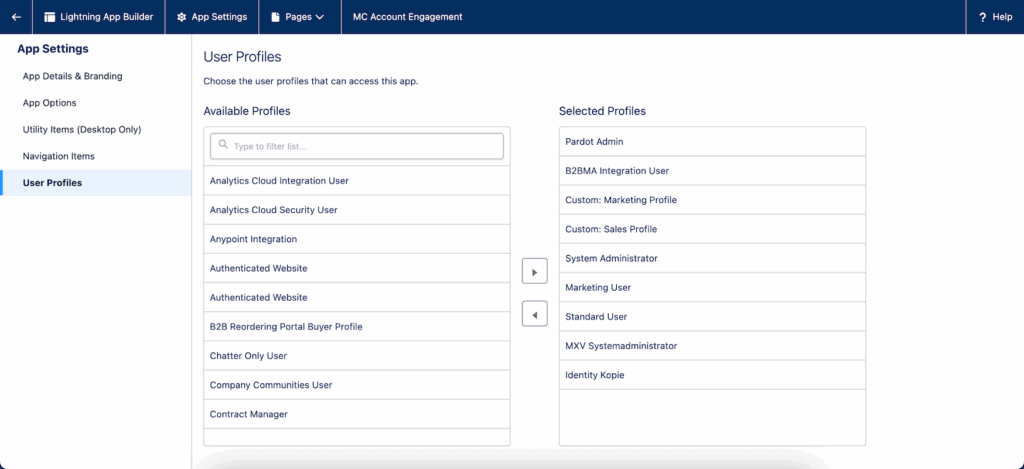
With Salesforce User Sync, Pardot roles are assigned based on Salesforce profiles. Profile-to-role mapping must be reviewed to avoid over-permissioned users. Adjustments can be made manually or en masse using user import tools.
UI Optimization with Lightning Components
The Pardot Lightning App integrates natively with the Salesforce Lightning Experience and includes optimized components like:
- Engagement History Components for leads/contacts
- Engagement Metrics Dashboards on campaign records
- Matched Leads Component on account layouts
Component usage should be measured via page load analytics and user feedback. Use visibility filters to present different layouts per user profile.
Reporting Performance
Leverage native integration of synced Pardot data with Salesforce reports and dashboards. For advanced needs, use B2B Marketing Analytics (B2BMA) to visualize trends across connected datasets. Monitor report types and operators used – especially avoid “contains” which slows down queries.
Common Risks and Mitigation Strategies
A well-architected Pardot implementation accounts for known operational risks. Here are some of the most critical ones:
| Risk | Consequence | Mitigation |
|---|---|---|
| Multiple Prospects with Same Email (AMPSEA) | Prospect activity linked to wrong record | Audit duplicates and understand AMPSEA behaviors |
| “Most Recently Updated” field sync setting | Misleading data overwrites on records | Use controlled sync settings; avoid simultaneous CRM updates |
| Poorly scoped segmentation rules | Slow processing and automation queues | Use one-off rules and sub-sets for frequent actions |
| Connector sync lag for large updates | Delayed record handovers from Pardot to Salesforce | Stagger updates and monitor sync health during campaigns |
| Invalid metadata changes in Salesforce | Connector sync errors and data loss | Coordinate field/validation rule updates between teams |
Final Recommendations and Proactive Practices
To keep your Account Engagement instance running efficiently within your Salesforce architecture, consider these proactive steps:
- Use Account Engagement Optimizer routinely to flag automation or segmentation inefficiencies.
- Monitor your recycle bin for cleanup opportunities that won’t impact data integrity.
- Implement sync error monitoring as a daily or weekly routine.
- Design integrations with an intentional split between Pardot and Salesforce endpoints.
- Test automation and asset functionality before major deployments or campaign launches.
Plan Your Next Move with Confidence
Account Engagement provides marketing teams with robust automation at scale – but only when paired with smart engineering decisions. If you’re navigating complex Salesforce architectures and want to ensure Pardot is optimized across performance, data integrity, and usability, we’d love to help guide the way. Get in touch with our consultants today: /get-in-touch/