When to Use Pardot Form Handlers Instead of Forms
Discover when to use Pardot form handlers instead of forms for better flexibility, integration, and control over your lead capture strategy.

If you’re weighing up whether to use native Pardot forms or Pardot form handlers for your lead capture, you’re not alone. The choice carries technical, operational, and even strategic implications.
In this article, we’ll explore what Pardot form handlers are, how they work, and the six scenarios where they’re the preferred solution over Pardot’s native form builder. We’ll also highlight several popular third-party tools that commonly integrate via form handlers.
- Form handlers connect your own forms, on your website or a third-party tool, to Pardot as a data collection endpoint.
- They’re the right choice when you already have a library of forms, or need features Pardot forms don’t offer.
- Tools such as FormAssembly often sit in front of Pardot and pass data on through form handlers.
- Map only the fields Pardot needs, check cookie consent for tracking, and test middleware like Zapier thoroughly.
What Are Pardot Form Handlers?
Pardot form handlers allow you to connect external forms – such as those on your existing website or a third-party platform – directly into Pardot (also known as Marketing Cloud Account Engagement). Think of form handlers as the data collection endpoint. Instead of building and embedding a Pardot form, you embed your own form and have it post the data to Pardot via the form handler “Endpoint URL”.
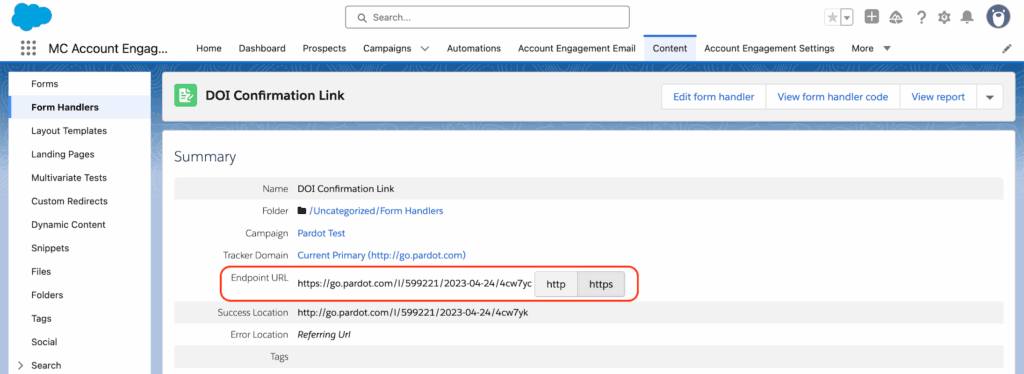
This approach is akin to how Salesforce Web-to-Lead forms work. You define the desired fields, generate a unique Pardot endpoint URL, and embed that URL in your external form’s code. When users submit the form, Pardot captures the relevant data, tracking what it refers to as a “form success.”
Why Use Form Handlers Instead of Pardot Forms?
Pardot forms come with advantages like progressive profiling, built-in spam protection, and customizable layout templates. That said, Pardot form handlers shine in scenarios where those native capabilities just won’t cut it – or where existing infrastructure makes it impractical to overhaul your form system.
6 Scenarios Where Pardot Form Handlers Are the Right Choice
Let’s walk through six common use cases where form handlers are not only useful – they’re essential.
1. Accommodating Your Existing Form Infrastructure
Many organizations migrating to Pardot already have a comprehensive library of forms across their website, demand gen programs, or partner portals. Rebuilding every form in Pardot may not be feasible due to time, cost, or technical resources.
In one real-world case, a university with dozens of program inquiry forms chose to implement form handlers to connect their existing CMS-based forms with Pardot – allowing them to capture prospect data immediately while planning a phased transition to native Pardot forms during their next enrollment cycle.
2. Avoiding Storage of Sensitive Information
Pardot is not designed to store sensitive or personally identifiable data such as:
- Passwords
- Credit card or payment information
- Government-issued ID numbers
For instance, if users are authenticating into a portal, that transaction should be handled by the portal itself – not Pardot. Since Pardot doesn’t support encryption/decryption for submissions, storing sensitive data there creates compliance risks. Form handlers let you limit which fields are sent to Pardot and which are handled securely elsewhere.
3. Working with Portals and eCommerce Platforms
When forms are tightly coupled with transactional systems – like eCommerce checkouts or customer portals – altering the form structure is often out of the question. You need these forms to maintain their core functionality because they’re mission-critical.
With form handlers, you’re able to listen in on those events (like purchases or logins) and capture relevant prospect activity in Pardot without interfering with the core business process.
4. Supporting File Uploads or Attachments
Pardot forms don’t allow file uploads such as resumes, proof of address, or images. If your use case includes collecting documents, you’ll have to use an external form platform that supports attachments – and then use a Pardot form handler to capture the rest of the submission data.
Example use cases include:
- Job applications requiring resumes
- Event requests with image specs
- Verifications requiring ID upload
5. Creating a Unique or Interactive User Experience
Want your forms to stand out with animation, logic jumps, or conversational UX elements? Tools like Typeform and Jotform offer superior user experience features that Pardot simply doesn’t support out of the box.
Using a form handler allows you to embed dynamic third-party forms while ensuring the essential data points are piped into Pardot.
6. Applying Complex Validation Logic
Pardot forms support basic field validation, such as:
- Ensuring an email format is valid
- Dropdown-style field selection
- Date fields and business domain email filtering
However, if you need advanced data validation (e.g. disallowing free email domains, restricting entries based on regex, enforcing conditional logic), you’ll have to implement custom JavaScript – or better yet, offload the validation to a forms platform purpose-built for it.
Popular Tools to Use with Pardot Form Handlers
Many marketing teams opt to keep their form engines or landing page tools – especially when they’ve invested deeply or have other stakeholders depending on them. These platforms often sit upstream of Pardot and integrate via form handlers.
| Tool | Key Use Case |
|---|---|
| FormAssembly | Enterprise-grade forms with Salesforce-native integration and custom object support |
| Typeform | Slick, conversational form experiences that increase completion rates |
| Instapage / Uberflip | Third-party landing pages sending event and lead data back to Pardot |
| On24 / BrightTALK | Webinar platforms without native Pardot sync – capturing registrant data via form handler |
| WordPress Popup Plugins | Capture micro-conversions using embedded forms across content pages |
Key Considerations When Using Pardot Form Handlers
Before you rush to implement form handlers, remember the following:
- You only need to map Pardot-relevant fields in the handler setup. Other data can go elsewhere.
- Form handler tracking may require additional configuration to ensure compliant cookie consent.
- If you’re using a middleware tool like Zapier, test thoroughly to prevent data loss or sync issues.
Using the Right Tool at the Right Time
Pardot form handlers aren’t a silver bullet, but they’re a powerful workaround when your forms need to live outside of Pardot or support functionality it doesn’t offer. From portal logins to gated assets, file uploads to dynamic landing pages – Pardot form handlers let you meet prospects where they are, without sacrificing data quality inside your CRM.
If you’re unsure whether to switch, blend, or consolidate your form strategy, we can help you chart the right course. Let’s talk about how to make your form architecture work smarter for your marketing goals.