Pardot Business Units Guide for Scaling Enterprise Marketing
Streamline and scale enterprise marketing with Pardot Business Units. Learn setup tips, best practices, and implementation strategies.

Managing marketing operations across multiple regions, product lines, or corporate subsidiaries is no small task. That’s where Pardot Business Units come in – a powerful feature that allows enterprise organizations to segment and scale B2B marketing across teams, brands, or geographies from within a single Account Engagement instance.
This article explores what Pardot Business Units are, how they work, and how to implement them effectively in your marketing strategy.
- Business Units are separate Pardot databases in one Salesforce org, for regions, brands or product lines.
- Each has its own prospects, assets, domains and reports, and you control which users see which data.
- Plan carefully: you can’t delete or rename a Business Unit, or move it to another org.
- They need Pardot Advanced or Premium, connector v2 and the Pardot Lightning app.
What Are Pardot Business Units?
Pardot (Account Engagement) Business Units are standalone databases within a single Salesforce org that allow marketing teams to partition data, assets, and users. Each Business Unit (BU) operates semi-independently, providing different teams with the autonomy to run tailored marketing programs while still staying connected through a central CRM.
This makes them especially valuable for:
- Global enterprises with regional marketing strategies
- Organizations with multiple product lines or brands
- Businesses requiring stricter data governance and privacy controls
You can think of Business Units like dedicated marketing workspaces – each with its own prospect database, assets, branding, and reporting, all under one common Salesforce umbrella.
Why Enterprise Teams Use Pardot Business Units
Business Units solve key challenges faced by large marketing teams with distinct operational needs.
Partition Prospect Data and User Access
Before Business Units, anyone with Pardot access (excluding Sales users) could view all prospect data. With Business Units, you can now control which users see which prospects by BU – improving data security and regulatory compliance.
No More Complex Sharing Rules
Using Marketing Data Sharing (MDS) criteria, you no longer have to manipulate Salesforce sharing settings to control which records sync to each BU. This simplifies both configuration and long-term maintenance.
Tailored Branding and Infrastructure
- Set up multiple email sending domains and tracker domains per BU.
- Regions or brands can maintain distinct branding without overlap.
- Primary CNAMEs are mandatory, but additional domains can be configured at the asset level.
Switch Easily Between Business Units
The Business Unit Switcher lets users with access move between BUs from a single login. It’s an efficiency boost for admins or managers working across multiple units.
How Pardot Business Units Work
Each Pardot Business Unit has its own isolated infrastructure:
- Email and tracker domains
- Prospect database
- Assets: forms, files, images
- Reports and analytics
- Account-specific limits on automations and campaigns
However, if using the Lightning Email Builder, assets can be saved to shared folders accessible across BUs. This encourages reuse of branded templates and consistent messaging.
Marketing Data Sharing (MDS)
MDS rules determine which Pardot Business Unit a Lead or Contact record syncs to via the Salesforce-Pardot Connector. It’s critical to choose clear, deterministic logic – picklist fields are ideal as they reduce risk of error.
Important notes on MDS behavior:
- Fields used in MDS rules cannot be mapped to Pardot fields.
- Changing the field value later reassigns the prospect to another BU.
- Mistakes in MDS assignments are irreversible – planning is essential.
IDs and Navigation
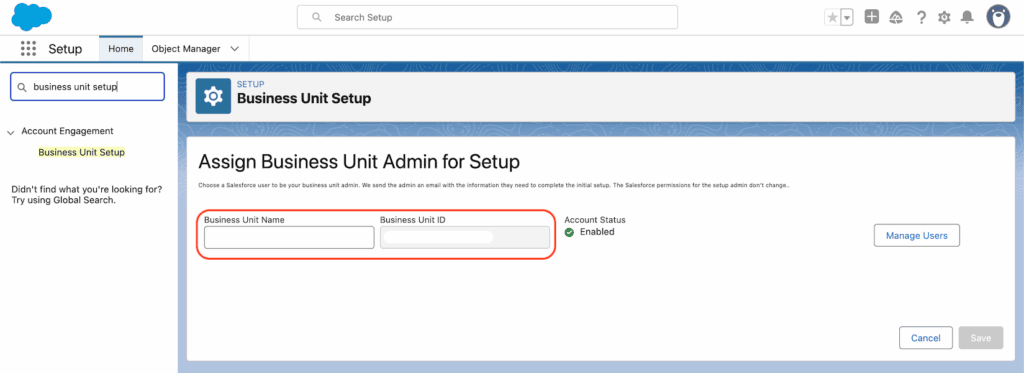
Each BU has a unique 18-digit CRM ID. Navigate to: Salesforce Setup → Pardot Account Setup to find Business Unit IDs and use the Switcher to jump between units.
Planning for Pardot Business Units
Pardot Business Units are powerful – but unforgiving. Once set up:
- You cannot delete a BU
- You cannot rename a BU
- You cannot change the Salesforce org it’s connected to
Because MDS rules are absolute, even one misclassified Lead can result in sync issues and data separation. A careful review of picklist values, campaign structures, and segmentation logic is vital before go-live.
Recommended Practices
- Create a custom picklist field solely for MDS criteria.
- Align Campaigns with unique record types per BU.
- Ensure Tracker Domains are unique per BU.
- Have clear policies for how leads and contacts can sync to one or multiple BUs.
Collaboration vs Isolation: Finding the Right Balance
While independence is a key feature, enterprise marketing doesn’t thrive in silos. According to Nebula Consulting’s Sarah Kelleher, organizations should balance separate BUs with opportunities to align on strategy and shared assets.
Here’s what can and cannot be shared across BUs:
| Item | Share Across Business Units |
|---|---|
| Users | ✅ |
| Email Domain | ✅ |
| Campaigns | ✅ |
| Emails, Landing Pages, Snippets | ✅ |
| Marketing App Extensions | ✅ |
| Prospects | 🔧 |
| Website Tracking, Reporting, Preferences | 🔧 |
| Tracker Domains | ❌ |
| Connectors, Custom Fields, Custom Objects | ❌ |
| Pardot Lists, Engagement Programs | ❌ |
Tips for Maximizing Business Units
1. Leverage the Salesforce Connector
Your success with BUs depends on the strength of your CRM integration. The connector enables syncing of data, campaigns, and engagement history across Salesforce and Pardot. Consider mirroring databases if your sales team is on board – or introduce a “Marketing/Nurture” stage for unqualified leads.
2. Use Connected Campaigns
Connected Campaigns are foundational. Without them, you won’t be able to centrally manage engagement history, snippets, or advanced reporting. Set up campaign record types that correspond to each BU for seamless control.
3. Explore the Pardot API
With version 5 of the Pardot API, you gain new opportunities to bridge data gaps and automate processes across platforms. Use it to build custom solutions or integrate with third-party martech tools where native options fall short.
4. Monitor the AppExchange
New apps for Pardot are emerging. One example is Nebula’s Enhanced Engagement History, which pulls engagement data from multiple BUs into a centralized dashboard. Keep an eye out for apps to streamline cross-BU reporting and workflow automation.
Prerequisites to Use Pardot Business Units
Before you can implement Business Units, these elements must be in place:
- Use Pardot Advanced or Premium Editions
- Use Connector v2 (released in 2020 and beyond)
- Adopt the Pardot Lightning App
Final Thoughts
Pardot Business Units are a game-changer for complex marketing teams, bringing structure, scale, and segmentation under one scalable platform. They do require extensive planning – especially when defining data rules, campaign types, and asset management frameworks. But if done right, they unlock enormous efficiency and cross-team consistency.
Need help planning your next Pardot Business Unit expansion? Get in touch with our team to explore how ConvertPilot can help your enterprise unify and scale marketing automation intelligently.