Pardot Dynamic Content Tips for Smarter Personalization
Learn how to use Pardot dynamic content to personalize emails, landing pages, and forms to drive engagement and conversions.

Dynamic personalization isn’t just a trend – it’s essential for engaging today’s B2B buyers. Marketing Cloud Account Engagement (formerly Pardot) gives you a powerful tool to serve personalized experiences across emails, landing pages, forms, and websites: dynamic content. But while dynamic content opens up opportunities, it also has its quirks and limitations.
In this article, we’ll walk through how dynamic content works, how to overcome common limitations, and how to build a scalable personalization strategy in Pardot.
- Dynamic content tailors text or HTML blocks in emails, landing pages, forms and websites to each prospect’s data.
- Use prospect fields with fixed values, ideally dropdowns, so variations stay manageable.
- A content block can only use one prospect field; plan workarounds when personalization depends on more.
- Start with a strategy: which outcome, which audiences and where personalization matters most.
What Is Pardot Dynamic Content?
Dynamic content in Pardot allows you to tailor text or HTML blocks based on individual prospect data, delivering more relevant messages to your audience. It’s a way to serve personalized content variations within your marketing assets, increasing click-through and conversion rates by speaking directly to who that prospect is or what they’ve shown interest in.
You can embed dynamic content into:
- Emails
- Landing pages
- Forms
- Your website
Strategically placed dynamic content – for instance, right above a lead generation form – can boost list subscriptions by aligning with a prospect’s interests or attributes. But to unlock the full value, you need to understand how it works behind the scenes.
How to Create Dynamic Content in Pardot
Creating dynamic content in Pardot involves four main steps:
1. Check Prospect Field Settings
Ensure the field you plan to use for personalization is already created and configured with the proper field type. Dropdowns are preferred because their fixed values make content variations easier to manage. While text or number fields can be used, they increase the risk of errors and complexity.
2. Navigate to Dynamic Content Builder
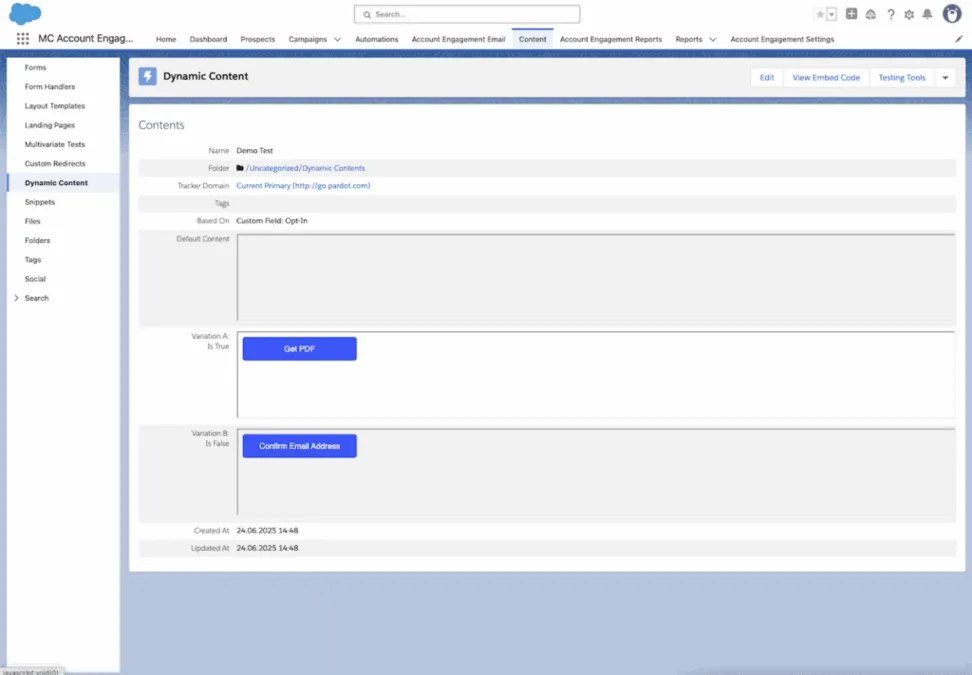
Go to Content → Dynamic Content. Choose the prospect field that will determine which variation is shown – this becomes your “based on” field.
3. Add Variations
Create your custom content versions and define what field value should trigger each version. One variation is always set as the default for unmatched records.
4. Embed the Dynamic Content
Add the code snippet into Pardot’s email builder, landing page builder, form wizard, or even externally onto your website.
Key Limitations and How to Solve Them
While dynamic content is powerful, it comes with a few notable limitations. Let’s explore the challenges and how to smartly work around each.
1. Only One Prospect Field at a Time
Dynamic content in Pardot can only reference a single prospect field per content block. But what if personalization depends on two or more variables – like region and persona?
Solution: Combine Fields via Automation Rules
Create a new custom prospect field that consolidates values from multiple fields using automation rules. For example:
- If State = “California” or “Oregon”, set Region = “West Coast”
- If Profile = “A” and Region = “Northeast”, set Combined Field = “Northeast Profile A”
This composite field then acts as your dynamic content driver. Automation makes the personalization scalable without bloated field structures.
2. Dynamic Content Doesn’t Use Custom Object Data
You can’t directly use Salesforce custom object fields in Pardot dynamic content.
Option 1: Map Custom Object Data via Formula Field
- Create a formula field on the Lead or Contact in Salesforce that pulls in the relevant value from the custom object.
- Map that formula to a Pardot custom field.
Note: Formula fields don’t trigger syncs with Pardot when they change. Set up automation or field updates to ensure the data remains current.
Option 2: Use a Pardot Custom Object (if available)
If your Pardot edition supports custom objects, you can bring in object data and use automation to populate prospect fields from them. While technically viable, this approach tends to be more complex. Option one is typically more efficient.
3. No “Is Empty” Rule Allowed
Pardot does not allow dynamic content to target blank values. You can’t control which variation displays based on an empty field.
Solution: Include a Blank Option in Dropdown Fields
Edit the dropdown prospect field and ensure there’s a blank value (paired with a label like “Select one”). Even though Pardot treats blank values as valid in the dropdown, if the form is required, prospects must choose a non-blank option to submit – maintaining your data quality while letting you target blanks in dynamic content rules.
4. 25 Variation Limit
Pardot caps dynamic content variations at 25 total (one default + 25 custom). This can restrict complex personalization strategies.
Solution: Expand Logic Using HML IF/ELSE Statements
When HML (Handlebars Merge Language) is enabled in your account, you can integrate IF/ELSE logic within your dynamic content blocks.
Example:
- If recipient program = Group A → show: “Discover how our platform helps tech companies scale faster.”
- If Group B → show: “Discover how our platform improves patient engagement.”
- If unknown → show: “Discover how our platform drives growth across industries”
Use this to smartly bypass the variation limit and ensure fallback content shows if no match is made.
Best Practices for Scaling Pardot Dynamic Content
As with any personalization effort, a few foundational best practices can help you maximize ROI while keeping projects maintainable.
1. Start with Strategy
Don’t jump right into building variations. Ask:
- What outcome are we aiming for?
- Which audiences matter most for personalization?
- Where should this content live in the customer journey?
2. Prioritize Variation Order
Pardot reads dynamic content from top-to-bottom, showing the first matching variation. Always list more specific variations first and general ones last.
3. Keep It Simple
The more variations you have, the harder they are to maintain. Stick to scalable combinations and evergreen messaging wherever possible.
4. Don’t Overthink Styling
Dynamic content automatically inherits the surrounding asset’s styling. Focus on writing the best possible copy – HTML formatting should be minimal or unnecessary.
5. Test Before Launching
Preview content using “Preview as Prospect” in emails, or set yourself up with test records to simulate field values. This is the only way to confidently test form and landing page variations.
Final Thoughts
Dynamic content is one of the most impactful features in Marketing Cloud Account Engagement, but it requires strategic planning and technical creativity to get right. Understanding both its capabilities and its workarounds lets you build smarter, more scalable campaigns that resonate with your prospects – without overcomplicating your Pardot environment.
Need help implementing a dynamic content strategy that actually converts? Get in touch with our team – we’d love to hear about your goals.