


Salesforce Account Engagement (formerly Pardot) integrates tightly with Salesforce CRM to create a powerful B2B marketing automation engine. This guide explores how the integration works, from syncing leads and contacts to enabling sophisticated marketing workflows that respond to real-time sales activity.
If your team relies on Salesforce, understanding the data and functionality shared between the two platforms is key to getting the most value out of your investment. Let’s dive into the core integration capabilities, sync behaviors, lead assignment strategies, and extended features that bring Pardot and Salesforce together.
How Pardot Integrates With Salesforce
Pardot connects with Salesforce through a native integration known as the Salesforce Connector for Pardot. It synchronizes data between the two platforms and is available to all Pardot customers. This connector has evolved over time – its latest version (“v2”) simplifies setup and improves control over data syncing without requiring a dedicated user license.
Why a Connector Is Needed
Originally, Pardot was a standalone platform acquired by Salesforce in 2013. Since then, it’s moved closer to Salesforce’s core architecture – but the connector still plays a critical role in aligning data and workflows across marketing and sales teams.
Salesforce Objects Synced with Pardot
Pardot syncs natively with a range of Salesforce objects. Here’s what data Pardot can access and update:
| Salesforce Object | Sync Direction | What Pardot Can Do |
| Lead | Bi-directional | Create, read, and update |
| Contact | Bi-directional | Read and update |
| Person Account | Bi-directional | Read and update |
| Accounts | Salesforce → Pardot | Read only |
| Opportunities | Salesforce → Pardot | Read only (requires Opportunity Contact Roles) |
| Campaigns | Read (Salesforce → Pardot), Update (Pardot → Salesforce) | Connected Campaigns and engagement metric updates |
| Campaign Members | Salesforce → Pardot | Create and update |
| Tasks | Salesforce → Pardot | Create |
| Users | Salesforce → Pardot | Read |
What Pardot Does in Salesforce
Pardot’s integration with Salesforce enables seamless data flows through the funnel – from lead capture and scoring to opportunity engagement and closed revenue. Let’s explore how this plays out within core CRM objects.
Leads and Contacts
When Pardot identifies a marketing-qualified lead, it can create a Lead record in Salesforce. As sales qualifies this person, converting the Lead into a Contact, that sync persists and updates flow in both directions. If reverse syncing is enabled, Pardot can also create Contacts directly instead of Leads.
Accounts and Opportunities
Pardot can read Account and Opportunity data to enrich segmentation and automation. Crucially, it relies on Opportunity Contact Roles to associate people (Contacts/Prospects) with deals. This allows you to trigger nurture journeys or reactivation campaigns based on opportunity stage or status.
Campaigns and Engagement Insights
Connected Campaigns align Salesforce and Pardot campaigns so that both systems point to a single record. Pardot can update Salesforce Campaigns with meaningful metrics such as email open and click rates, which populate the Engagement Metrics component in Salesforce.

Campaign Members
Pardot can create and update Campaign Members – key for reporting and audience management. Completion actions in Pardot (e.g., form submissions or link clicks) can change a member’s status, reflecting deeper engagement in Salesforce analytics.
Tasks and Sales Alerts
Pardot can generate Salesforce tasks automatically, alerting sales reps when prospects re-engage. These Tasks are one-directional – once created, they live entirely within Salesforce.
Users and Role Mapping
User synchronization enables you to manage access in one place. Profiles in Salesforce map to user roles in Pardot automatically, simplifying admin workflows.
Other Ways Pardot and Salesforce Work Together
Beyond object syncing, several advanced features help unify marketing and sales strategies across both platforms.
Field Sync Behavior
Conflicts can arise when both systems update the same fields. Sync behavior determines whether Pardot or Salesforce wins in a data dispute – configured field-by-field. You can decide which side is the ultimate source of truth.
Lead Assignment
A Pardot prospect must be assigned before syncing to Salesforce. Assignment options include:
- Active Salesforce lead assignment rules
- Automation rules in Pardot
- Salesforce queues and Round Robin assignments
Custom Object Sync
Pardot can sync with custom Salesforce objects for advanced segmentation and automation. Despite the name, these “custom objects” can be standard objects not natively supported by the connector.
B2B Marketing Analytics
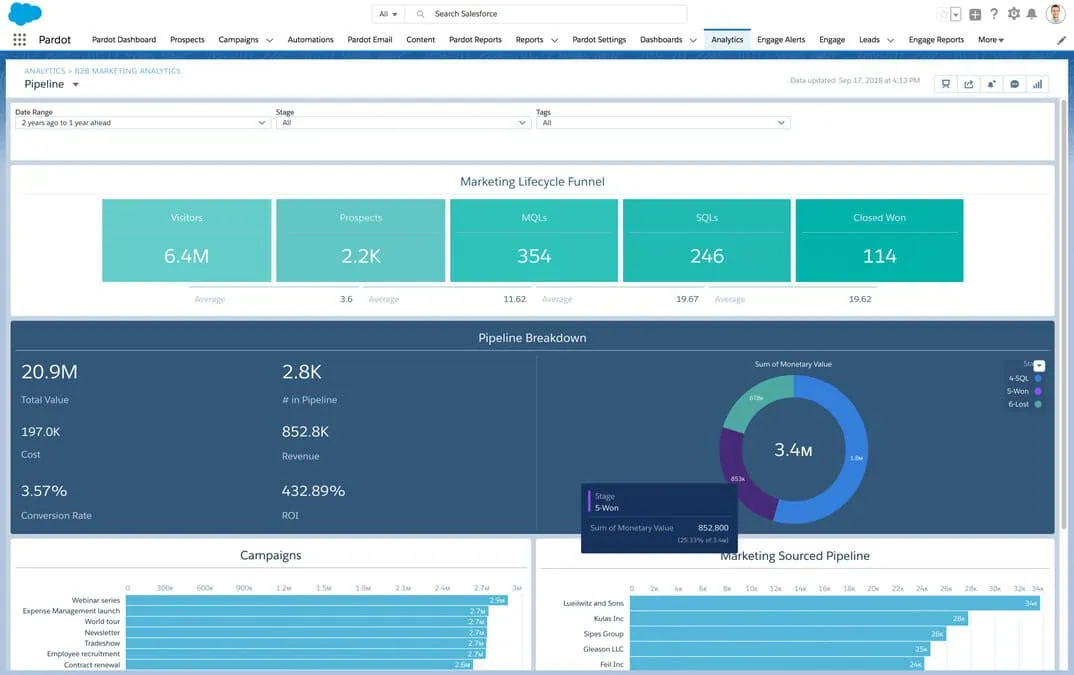
B2BMA lets you merge Pardot and Salesforce data into actionable dashboards. Using Object Sync, Pardot activity data is packaged into CRM Analytics datasets and visualized within Salesforce.

External Actions
Pardot can now trigger actions outside of its platform via Engagement Studio – like registering a prospect for a webinar, sending an SMS, or logging a case in Salesforce. These External Actions connect Pardot campaigns to third-party tools and Salesforce processes.
What Does Pardot Integrate With?
Fielding a modern martech stack means Pardot often needs to talk to other platforms. The integration options fall into three categories:
1. Native Connectors
- Pre-built integrations like GoToWebinar, ReadyTalk, or WebEx
- Simple to use but limited in scope and flexibility
2. Marketing App Extensions
- A low-code way to extend Pardot via the API
- Expose external activity types into Pardot for segmentation
- Enable External Actions for more automation use cases
3. Custom Integrations
- Using Pardot’s API (v5) or microservices like Workato, Zapier, or Tray.io
- Sophisticated data handling for complex business requirements
Understanding the Marketing-Sales Funnel with Pardot and Salesforce
Traditionally, marketing owned the top of the funnel while sales focused on the bottom. With automation and CRM integration, those lines are fading. Pardot’s data on Opportunity status or stagnation enables marketing to support re-engagement, upsells, and renewals – extending influence beyond the initial conversion.
Final Thoughts
Pardot and Salesforce are designed to complement each other – from data alignment to unified reporting, campaign orchestration, and sales enablement. But the integration isn’t “plug-and-play” unless you understand how to configure sync behaviors, map fields properly, and architect your funnel with clean data in mind. If you’re ready to take your B2B marketing automation to the next level, we can help you optimize the power of Salesforce and Pardot together.
Let’s talk about your Salesforce Account Engagement strategy.